SUPPORT PORTAL
QDat.io Support Portal
Everything you need to get the most out of QDat.io: detailed features, the QDatDroid report, a frequently-asked-questions guide, the API reference, the Cooldat data-exchange standard, and the backend changelog.
Features & functionalities
The QDat.io data plane
One trusted plane from edge devices to executive dashboards.
- ▸Capture Layer — secure connectors for sensors, ERP feeds, RFID/NFC scans, and operator events, with edge-to-cloud ingestion, automatic schema detection, and buffered delivery so nothing is lost when a device goes offline.
- ▸Verification Layer — time-stamped validation rules, confidence scoring, and tamper-evident records. Every event is cryptographically signed and stored in an immutable audit log.
- ▸Action Layer — trigger workflows, alerts, and API callbacks when thresholds or anomalies are detected, closing the loop between the physical world and downstream systems.
- ▸Spatiotemporal storage — every reading carries time and place, so you can query what happened, where, and when across the whole fleet.
QDatDroid
The Android field client that turns a phone or handheld into an RFID/NFC reader.
- ▸Provision a device against a cluster in a single scan: licence, MQTT broker credentials, and the device's command/response/data topics arrive together.
- ▸Reads UHF RFID (Zebra readers) and NFC tags (type A / type V), arms OPUS temperature dataloggers, and streams readings live over MQTT.
- ▸Built-in licence lifecycle: request a trial, validate on launch, sync usage, renew, or revoke — all from the device.
- ▸Writes a Digital Product Passport URL directly onto provisioned tags, so a public scan resolves to your branded page.
Cooldat® & NuroVault
Cold-chain temperature intelligence on a passive tag.
- ▸Continuous temperature history captured on the tag and reconciled into the QDat.io plane on every read.
- ▸Predictive shelf-life and excursion detection — see not just the current reading but where a product is headed.
- ▸NuroVault passive sensing with no battery to manage at the item level; Cooldat dashboards aggregate fleet-wide condition.
- ▸Montréal-grade jitter-tolerant ingestion: phone-tethered reads with no GPS still record cleanly instead of failing the batch.
Heli & SDPP
Field-ops tooling and the Spatiotemporal Digital Product Passport.
- ▸Heli.app — a companion field client in the QDat.io family for guided capture and provisioning.
- ▸Digital Product Passport (DPP) — public, no-auth pages at https://<dpp-host>/<id> rendering operator-authored HERO / IDENTITY / SPECS / LOCATION / PROVENANCE / DOCUMENTS / MATERIALS / CONTACT / QR sections.
- ▸Passport templates — branding, ordered sections, a closed field allowlist (adding a column never auto-leaks it), and auto-bind matchers so new tags inherit the right template automatically.
- ▸DPP rules engine — geofence + time (spatiotemporal AND) rewrite rules that redirect a visitor based on where and when a tag is scanned.
Web interface guide
A guided tour of the QDat.io web interface — captured from tapdpp.qdat.io
A guided tour of the QDat.io web interface — dashboard, readers, tags, temperature logging, Digital Product Passport, admin panel, and licenses. Captured from the live demo instance at tapdpp.qdat.io.
📅 June 1, 2026🌐 tapdpp.qdat.io🏢 Demo Department📦 1,204 Tags📡 14 Readers🌡️ Axzon OPUS NuroVault
Open the full documentationPlatform OverviewDashboardRFID ReadersTags🌡️ Temperature Tags & NuroVault LogsTag MapTag EventsAdmin PanelLicensesTechnical Architecture
Section 1
Platform Overview
QDat.io is a cloud-based RFID asset tracking and IoT sensor platform connecting physical RFID/NFC readers and smart tags to a central management system. It provides real-time inventory tracking, temperature data logging, geolocation mapping, and Digital Product Passports — organized into multi-tenant departments.
📡
RFID & NFC Tracking
Track thousands of UHF and NFC tags in real-time across multiple readers and locations.
🌡️
Temperature Logging
Monitor passive UHF sensors and Axzon OPUS battery dataloggers with full charting history.
🗺️
Geolocation Map
Visualize tagged assets on an interactive Leaflet map with clustering and GPS updates.
📋
Digital Product Passport
Public-facing DPP pages per EPC with product, manufacturer, and sustainability data.
⚡
Live Events Feed
Real-time stream of tag detections with dBm signal strength, reader ID, and timestamps.
🔑
QDatDroid Mobile
Android field reader app with device-keyed licensing — any Android phone becomes a scanner.
Demo Environment
The live instance at tapdpp.qdat.io runs in Demo Mode — a public sandbox with periodic resets. Pre-loaded with 1,204 tags, 14 readers, 24,000+ temperature readings, and 2,299 recent detection events.
Section 2
Dashboard
The landing page after login — real-time KPI tiles, recent tag detections, and quick-action shortcuts for the active department.
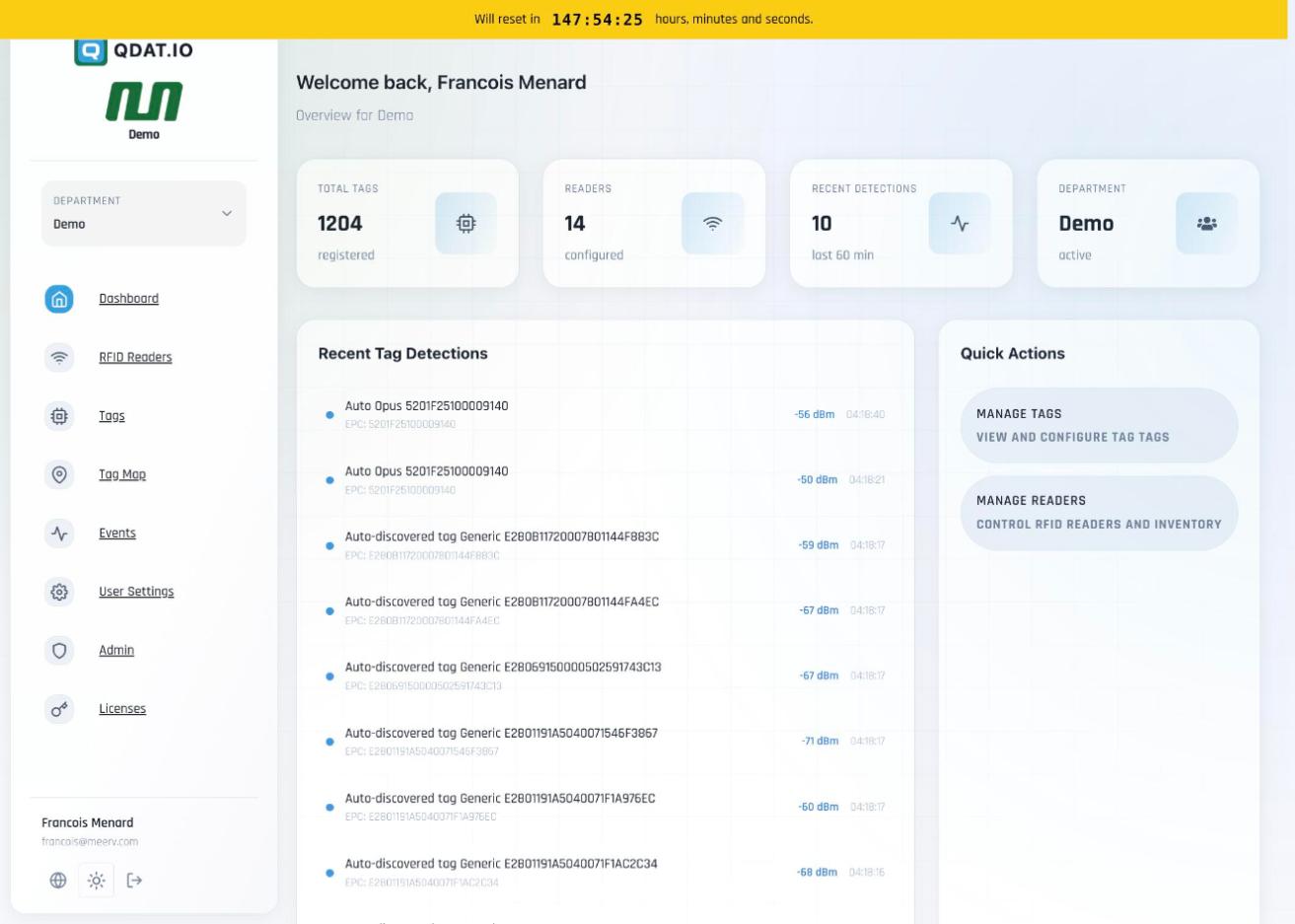
| KPI Tile | Demo Value | Description |
|---|---|---|
| Total Tags | 1,204 | All registered RFID/NFC tags in the department |
| Readers | 14 | Configured RFID reader devices |
| Recent Detections | 10 | Tag reads in the last 60 minutes |
| Department | Demo | Active organizational unit (multi-tenant) |
Section 3
RFID Readers
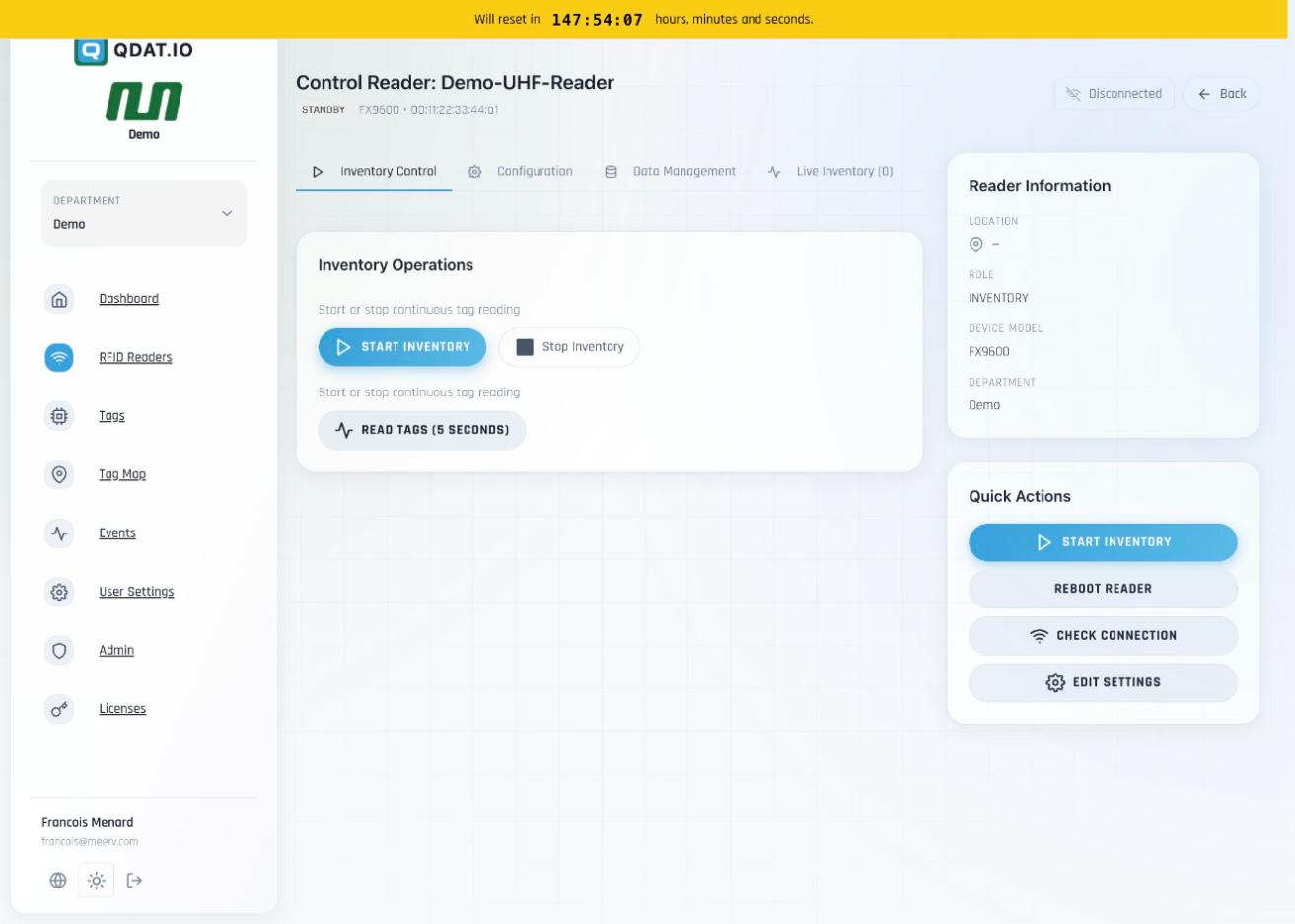
All physical RFID and NFC reader hardware — remotely controlled, configured, and monitored via a dedicated Control panel.
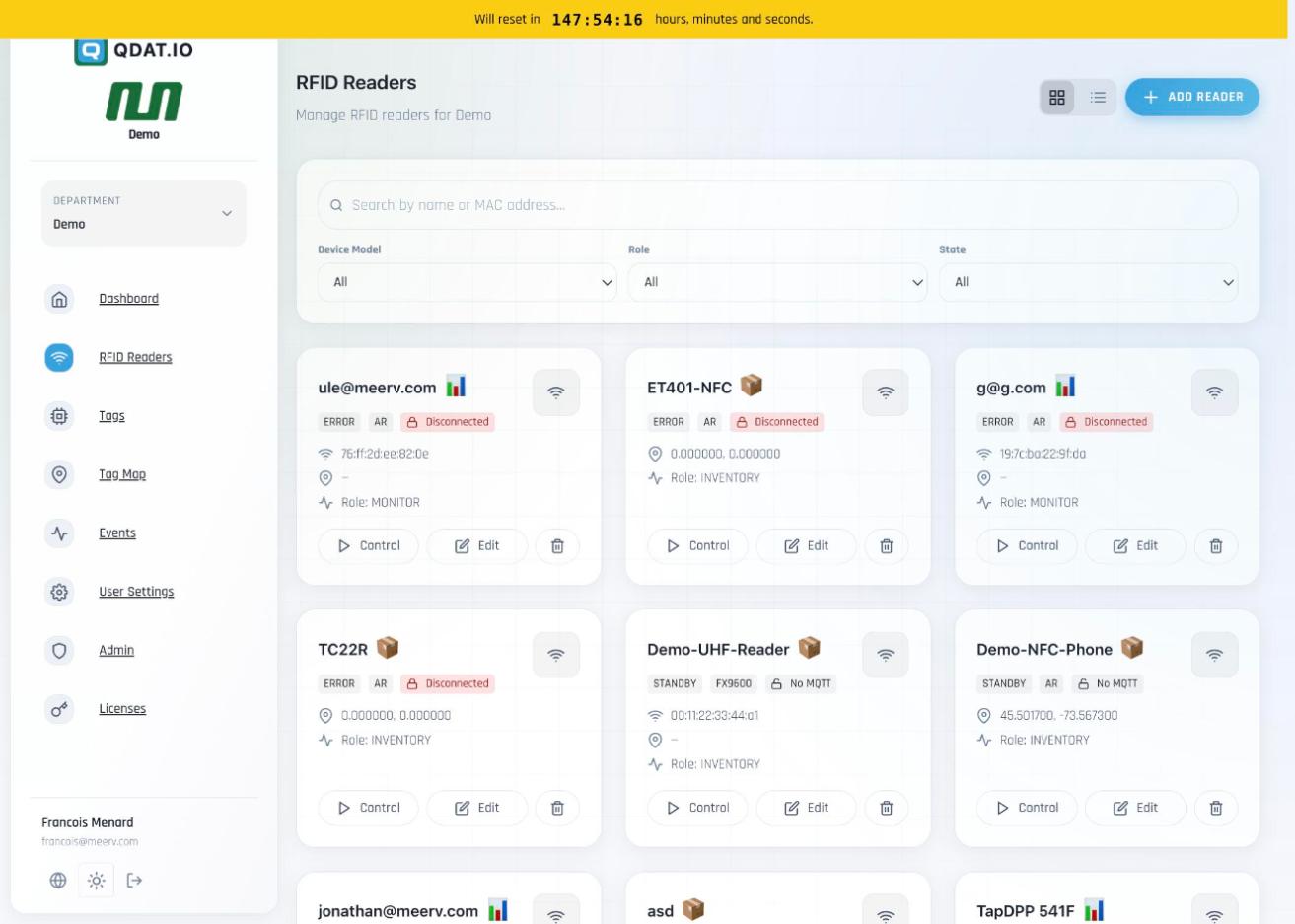
| Hardware | Role | Connection States |
|---|---|---|
| Zebra FX9600 (UHF Fixed) | INVENTORY — active tag scanning & data logging | Connected · Standby · Error |
| Zebra FX7500 (UHF Fixed) | MONITOR — real-time detection stream | Disconnected · No MQTT |
| QDatDroid (Android phone/tablet) | ||
| ET401-NFC / TC22R (Handheld) |
Control Panel Tabs
Inventory Control — Start/Stop continuous scanning, 5-second burst read | Configuration — Antenna power: LOW 15 dBm / MEDIUM 25 dBm / HIGH 30 dBm, state control | Data Management — Export tag data, clear reader memory | Live Inventory — Real-time detection view
Section 4
Tags
Central registry for all 1,204 RFID and NFC tags — with type filtering, state lifecycle tracking, battery monitoring, temperature log counts, and rich per-tag asset metadata.
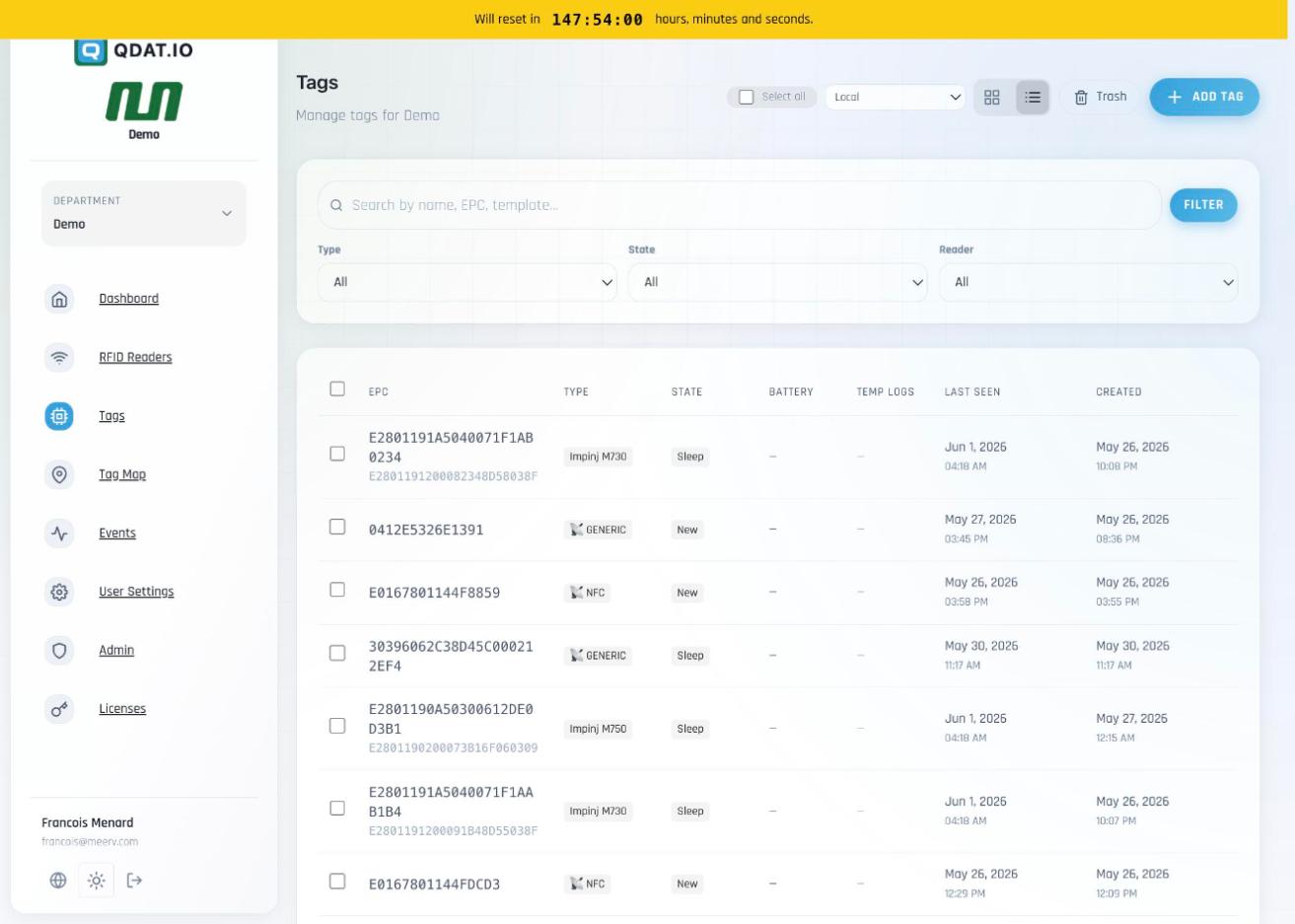
| Column | Description |
|---|---|
| EPC | Electronic Product Code — primary tag identifier (e.g. E2801191A5040071F1AB0234) |
| Type | GENERIC · NFC · TEMPERATURE · TEMPERATURE_DATALOGGER |
| State | New → Sleep → Standby → Ready → Armed → Logging → Finished → Alert → Invalid |
| Battery | Voltage for battery-equipped tags (e.g. Axzon OPUS: 4.09 V) |
| Temp Logs | Count of temperature data points stored on-chip ready to be harvested |
| Alert | Active alarm flag — triggered when temperature exceeds configured min/max thresholds |
Supported Tag Hardware
Impinj M730, Impinj M750, Impinj Monza R6, NXP Ucode 8, EM Micro, Axzon OPUS, and generic UHF/NFC passive tags. Bulk select, trash, and per-tag edit supported.
Section 5 — Featured
🌡️ Temperature Tags & NuroVault Logs
QDat supports two categories of temperature-sensing tags, each with interactive charts, configurable alarm thresholds, tabbed data views, and full asset management.
Type A — Passive UHF Temperature Tag
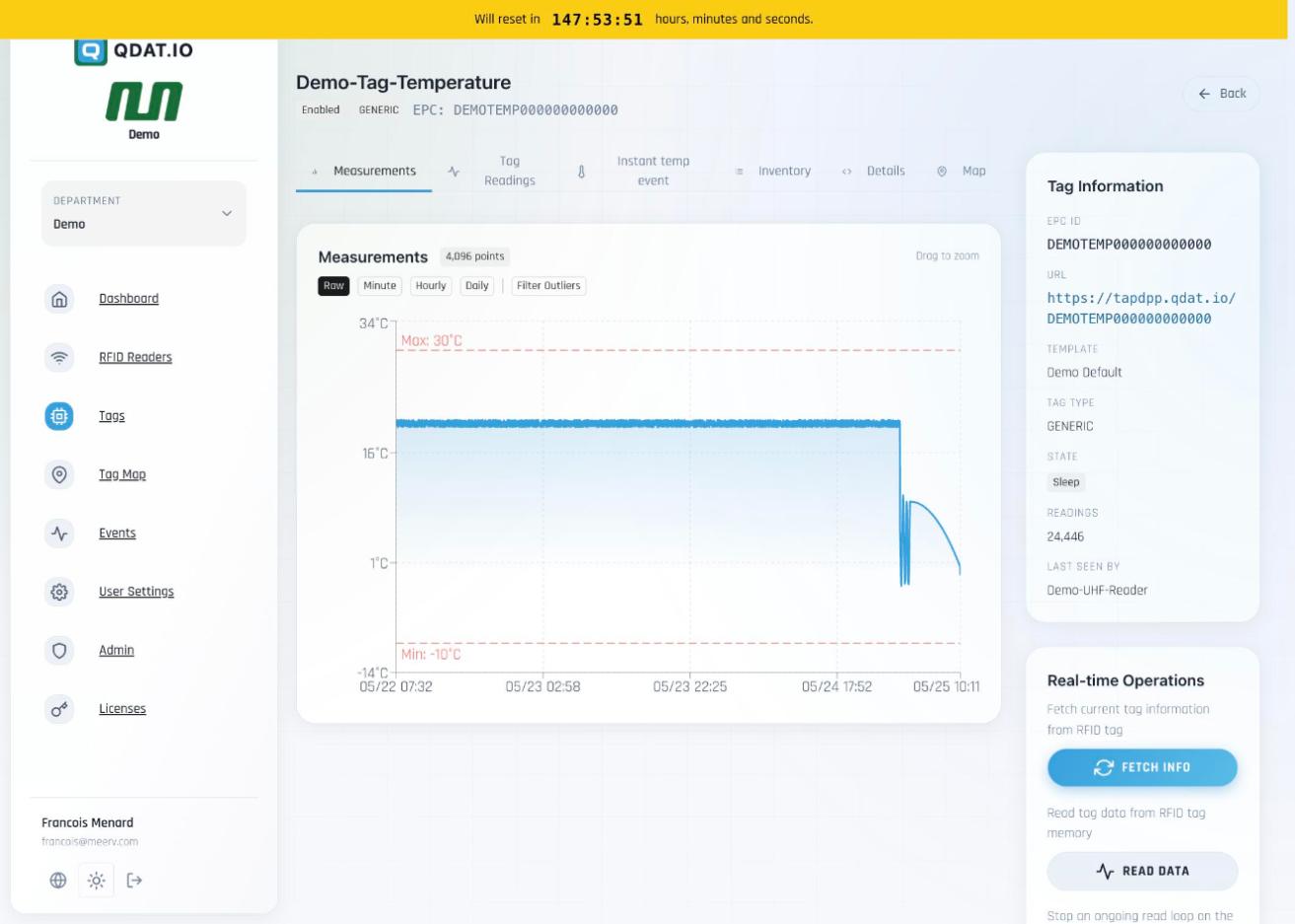
GENERIC · TEMPERATUREA passive UHF tag continuously sampled by a nearby reader (~1 reading/minute). No battery required — powered inductively by the reader's RF field. The reader streams readings directly to QDat. Example: DEMOTEMP00000000000 — 24,446 readings · Alarm: −10°C / 30°C
Type B — Axzon OPUS NuroVault Datalogger
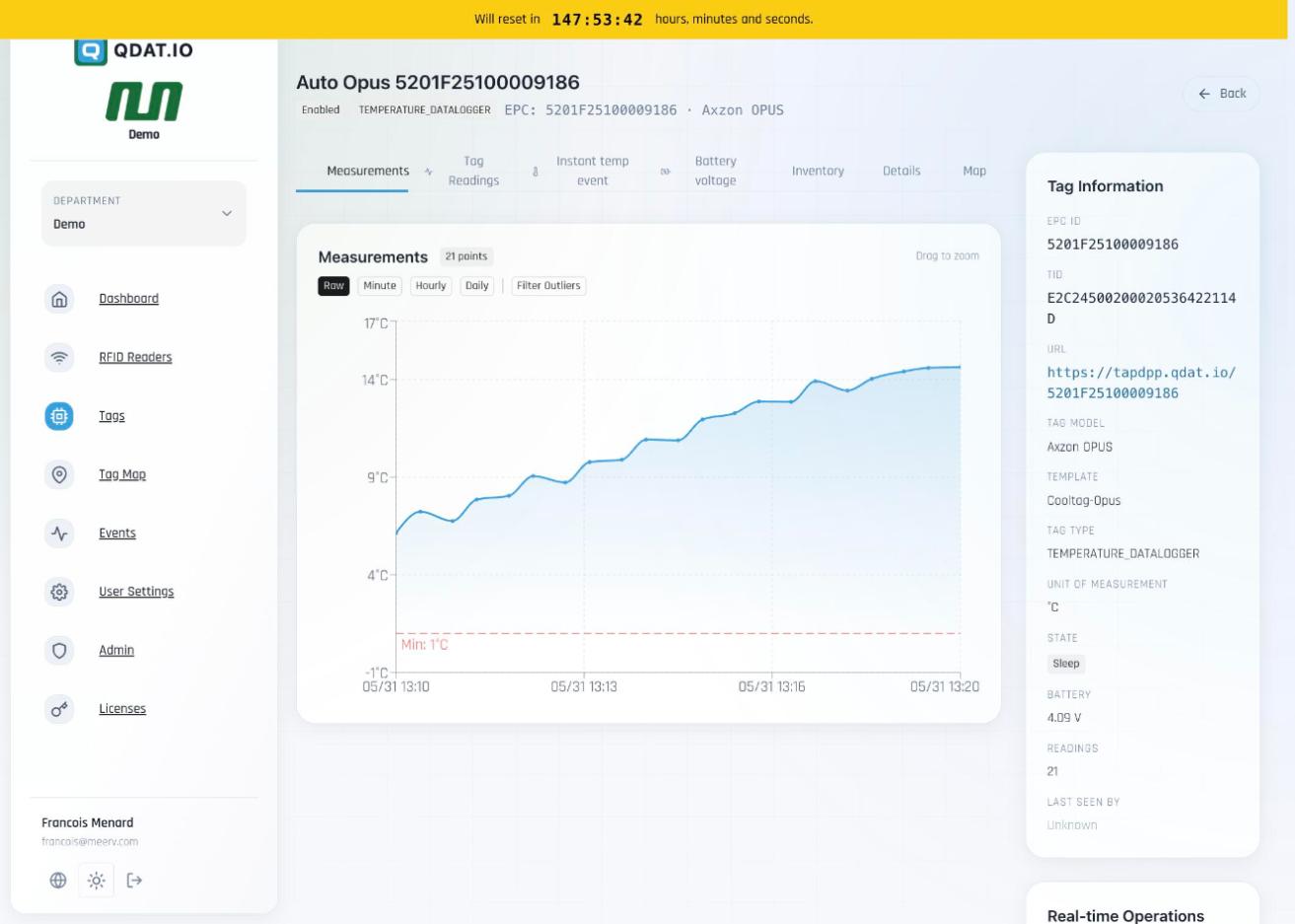
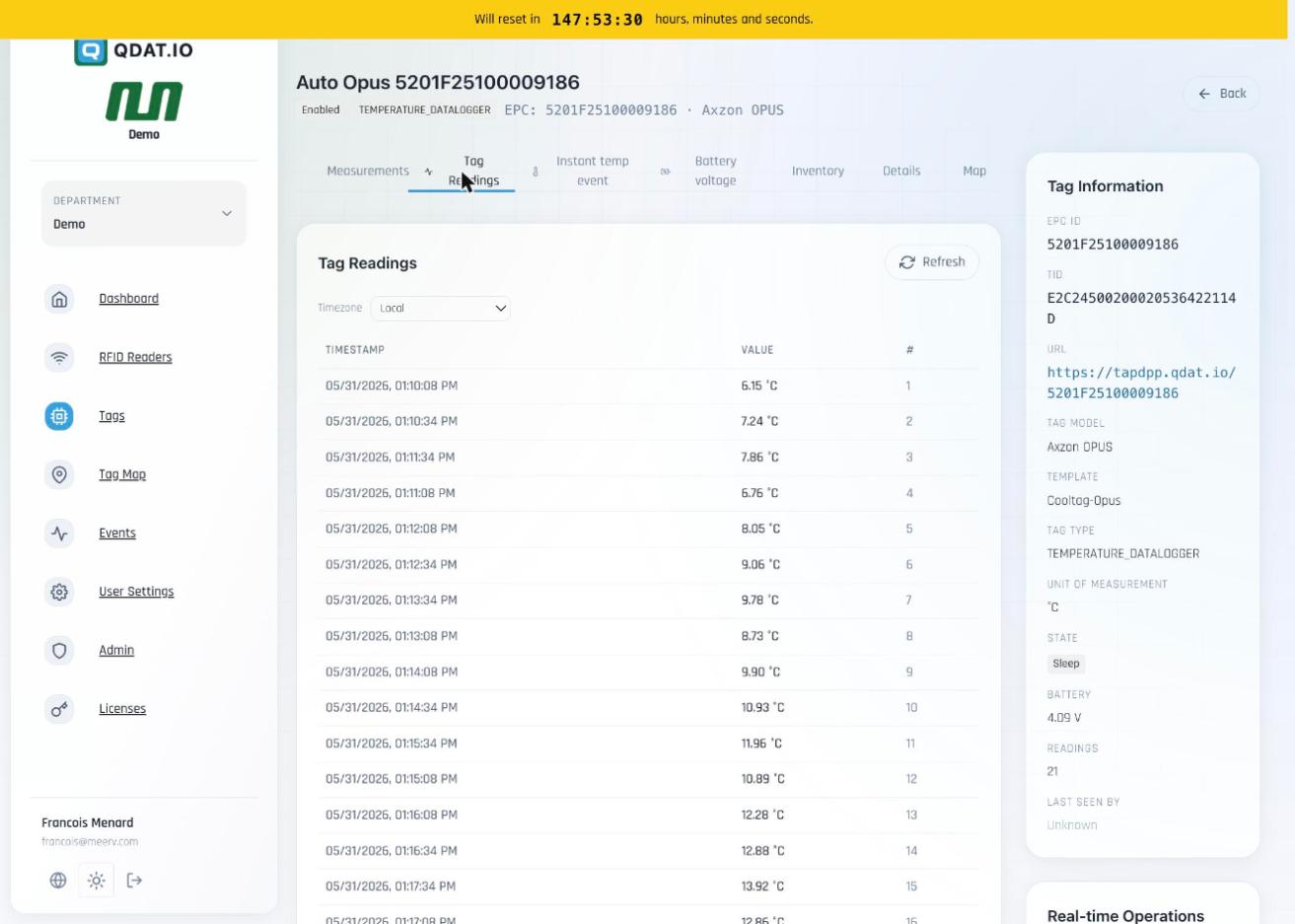
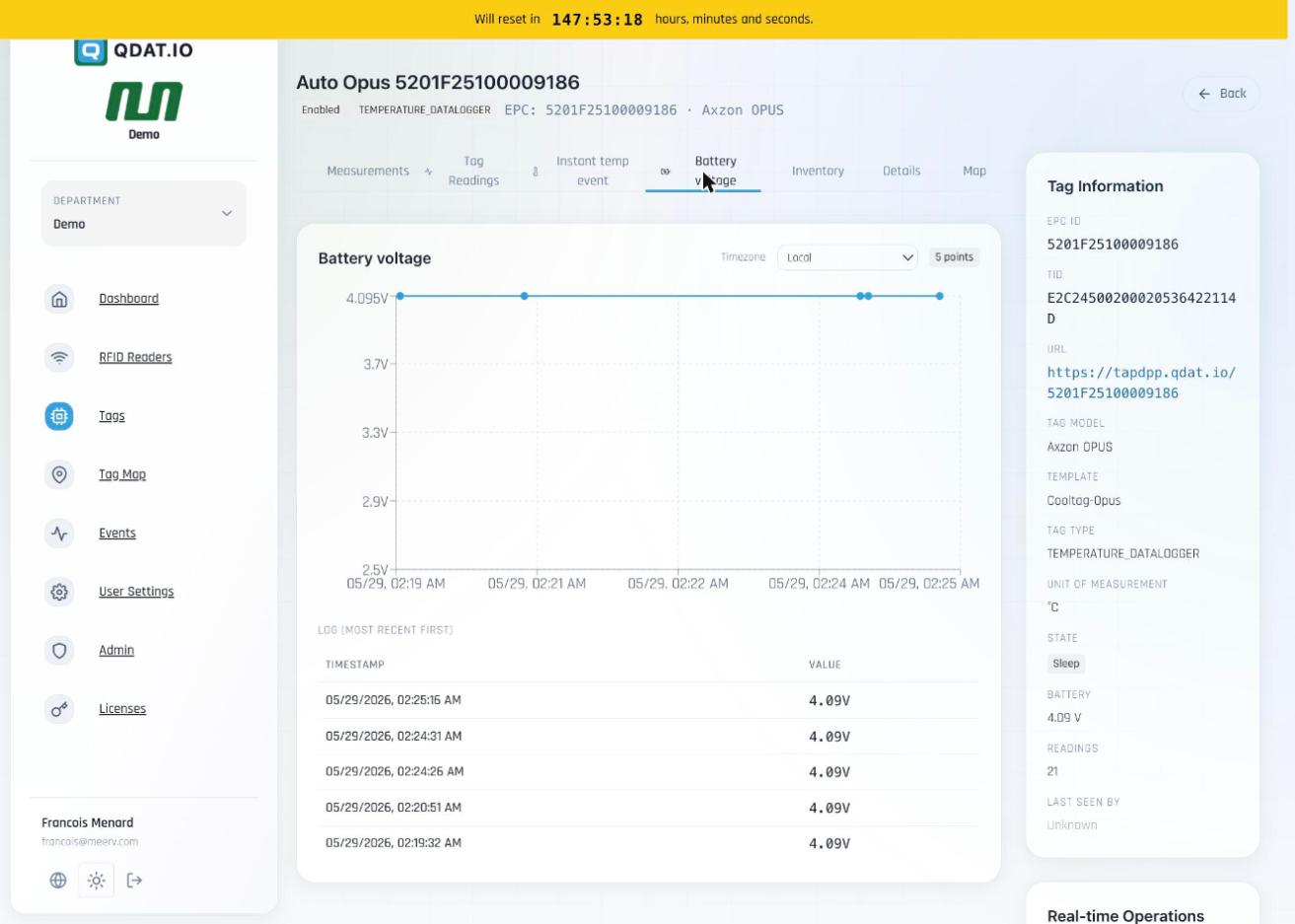
TEMPERATURE_DATALOGGERA battery-powered UHF RFID datalogger that records temperature autonomously on-chip, even with no reader present. When scanned, the full stored log is uploaded to QDat in one read. Template: NuroVault-Opus. Example: 5201F25100009186 · Battery: 4.09 V · 21 readings · Alarm: 1°C min / 100°C max · Public URL: https://tapdpp.qdat.io/5201F25100009186
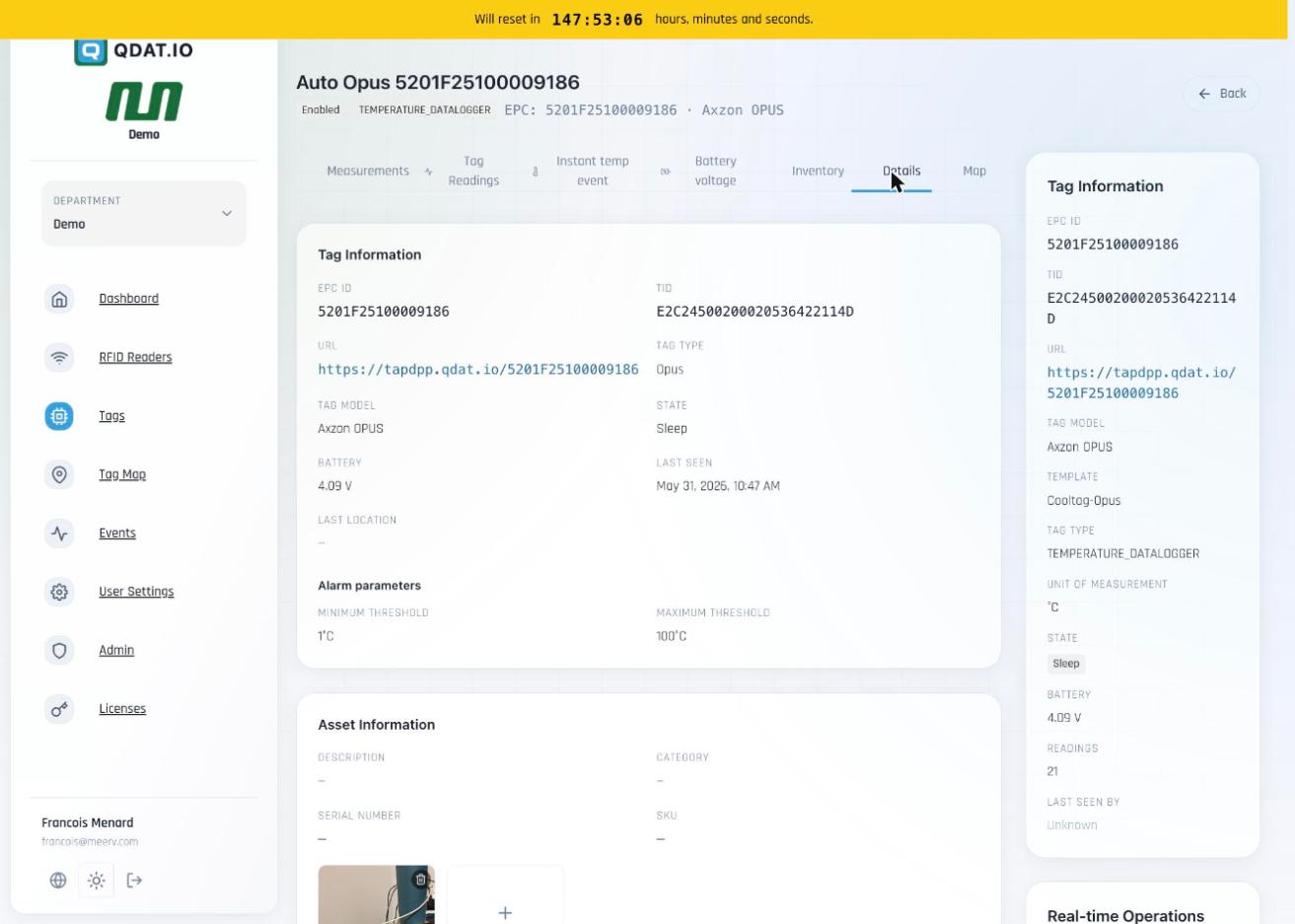
| Tab | Content |
|---|---|
| Measurements | Interactive time-series chart — Raw / Minute / Hourly / Daily aggregation, drag-to-zoom, red dashed alarm threshold lines |
| Tag Readings | Complete tabular log of every timestamped temperature reading with sequential index and timezone selector |
| Instant Temp Event | Snapshot of the most-recent single temperature reading fetched live from the tag |
| Battery Voltage | Voltage-over-time chart and log table (Axzon OPUS only) |
| Inventory | History of which readers detected this tag and when |
| Details | EPC, TID, URL, model, alarm thresholds (min/max), asset description/photo, building/floor/zone/room, management fields |
| Map | Last-known GPS coordinates pinned on interactive map |
Real-time Operations (per tag)
Fetch Info — pulls live sensor data from the tag via a nearby reader | Read Data — retrieves full stored log from chip memory | Stop Reader — halts the active read loop. Tag must be in range of a connected reader.
Section 6
Tag Map
Interactive geospatial view of all located assets. 1,145 of 1,204 tags have GPS coordinates assigned and appear on the map.
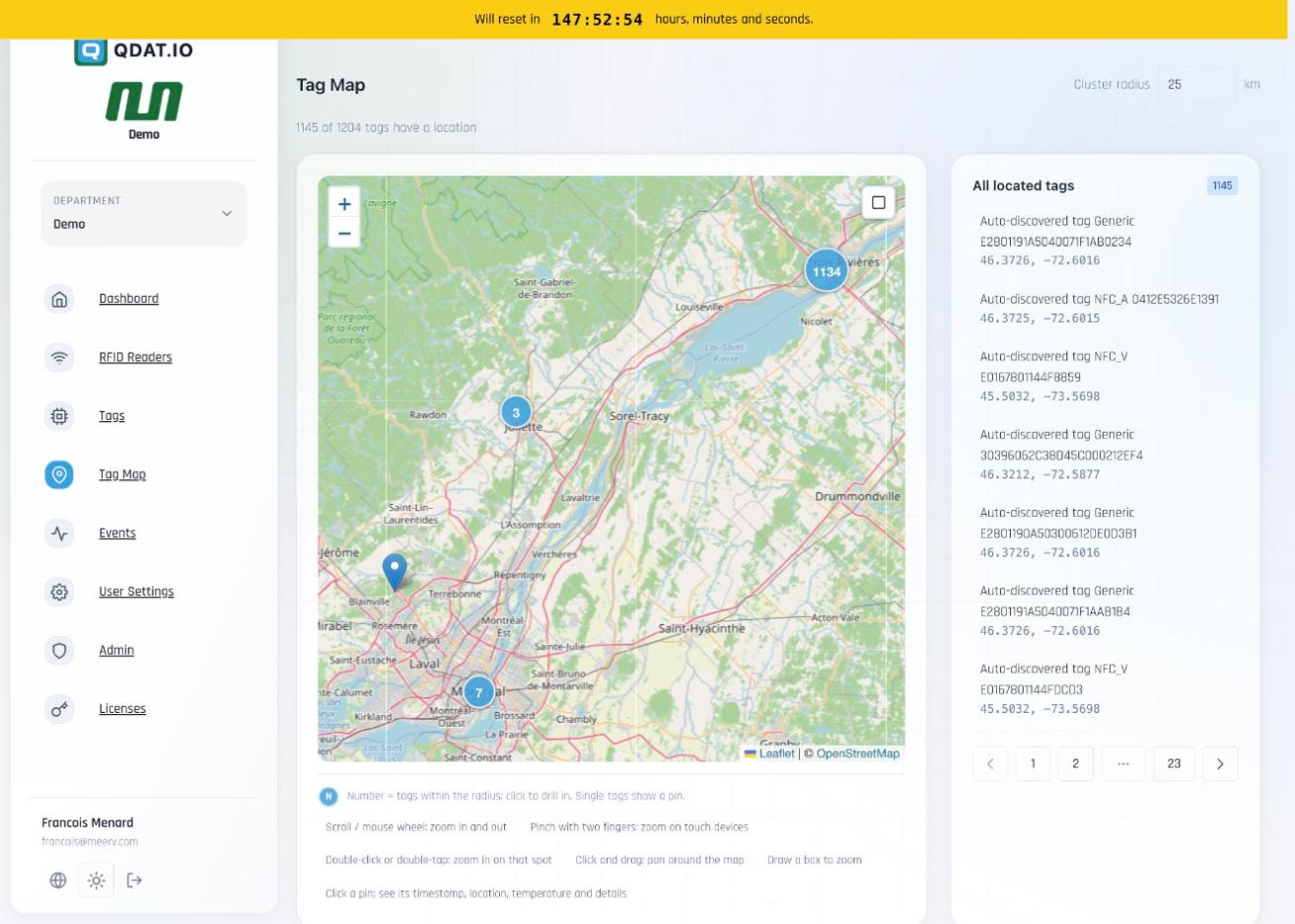
Tags are grouped into numbered cluster badges (e.g. "1134"). Clicking drills in to individual pins. Each pin shows the tag's last timestamp, coordinates, temperature reading, and a link to its detail page. Cluster radius is configurable (default 25 km). The right panel paginates all 1,145 located tags across 23 pages.
Section 7
Tag Events
Live-refreshing feed of all RFID tag detection events from the last 24 hours, showing signal strength and reader attribution for every detection.
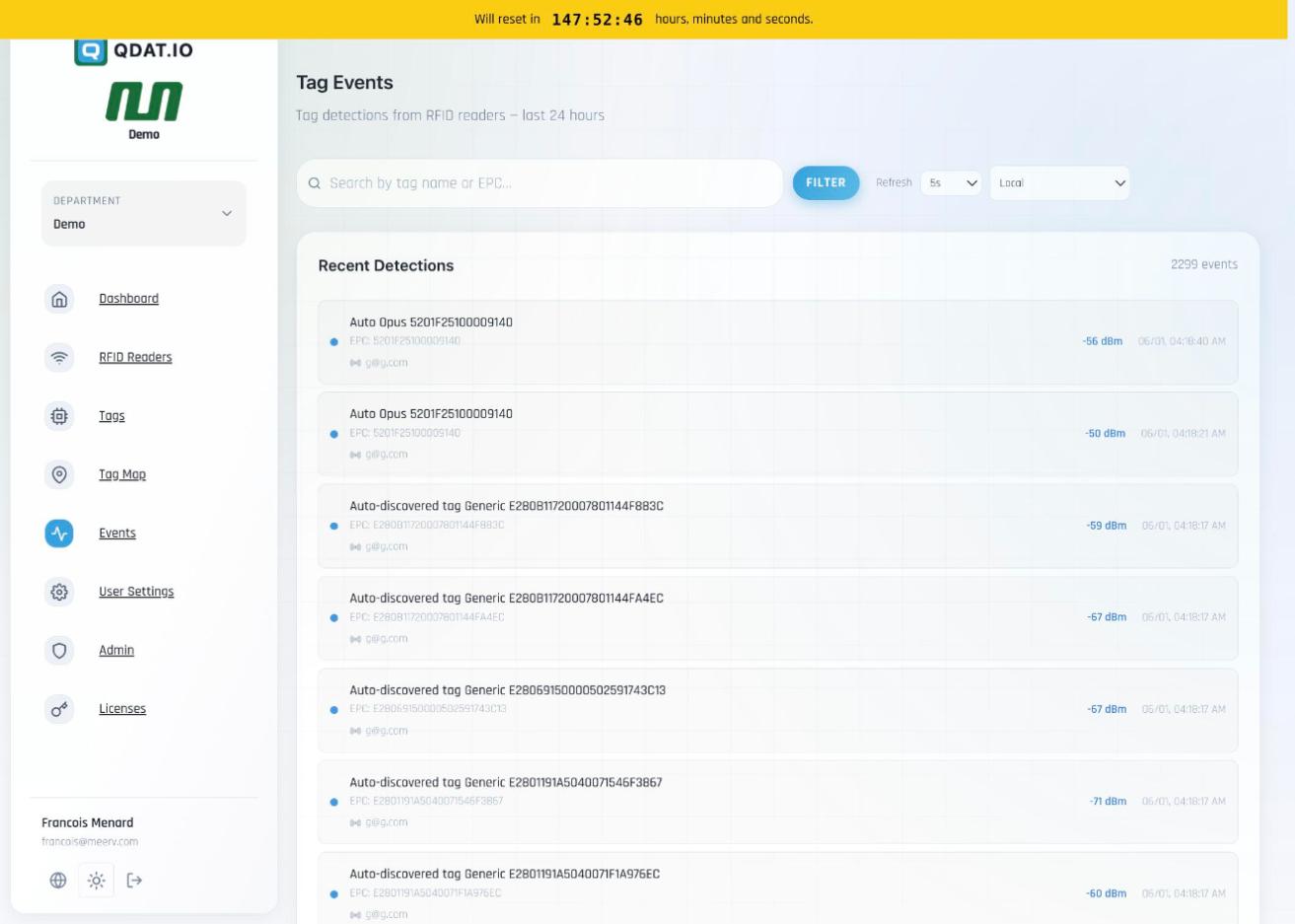
Each event shows: tag name (or auto-discovered EPC), full EPC code, signal strength in dBm (typically −40 to −70 dBm), timestamp, and the detecting reader's name. Refreshes every 5 seconds (configurable: 5s / 10s / 30s / manual). Searchable by tag name or EPC. Timezone-adjustable.
Section 8
Admin Panel
Complete system administration hub — departments, users, branding, API, Digital Product Passport authoring, and platform tooling.
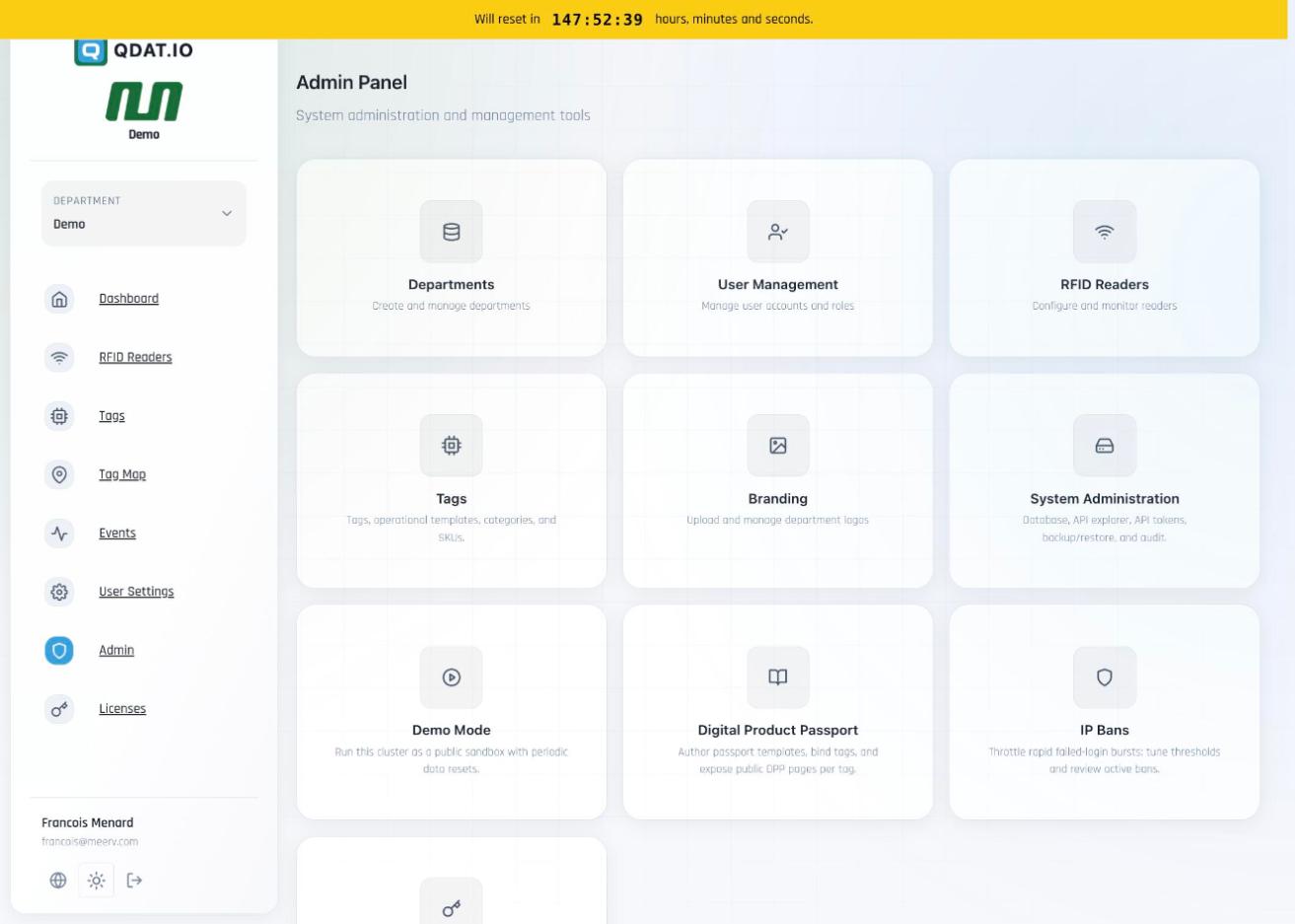
| Module | Description |
|---|---|
| Departments | Create and manage organizational departments with isolated data scopes |
| User Management | Manage user accounts, passwords, and role-based access control |
| RFID Readers | Global reader configuration and monitoring (admin-level view) |
| Tags | Tag templates, operational categories, SKUs — backbone of the tag registry |
| Branding | Upload and manage department logos shown in the platform UI |
| System Administration | Database inspector, Swagger API Explorer, API tokens, Backup/Restore, Audit log |
| Demo Mode | Run cluster as a public sandbox with configurable periodic data resets |
| Digital Product Passport | 5 passport templates, tag bindings, DPP records (product/manufacturer/sustainability), public tag URLs |
| IP Bans | Throttle rapid failed-login bursts; configure thresholds and review active bans |
| Licenses | Device-keyed QDatDroid licenses: issue, extend (+30 days), revoke |
Digital Product Passport
Each tag gets a public URL: https://tapdpp.qdat.io/<EPC>. The DPP admin manages Passport Templates (layouts + branding + auto-bind rules), Tag Bindings, per-EPC DPP Records (product description, manufacturer contact, representative, sustainability data), and reusable contact block libraries.
Section 9
Licenses
Device-keyed licensing for the QDatDroid Android mobile reader app. Each license is bound to a hardware Android Device ID and is global across all departments.
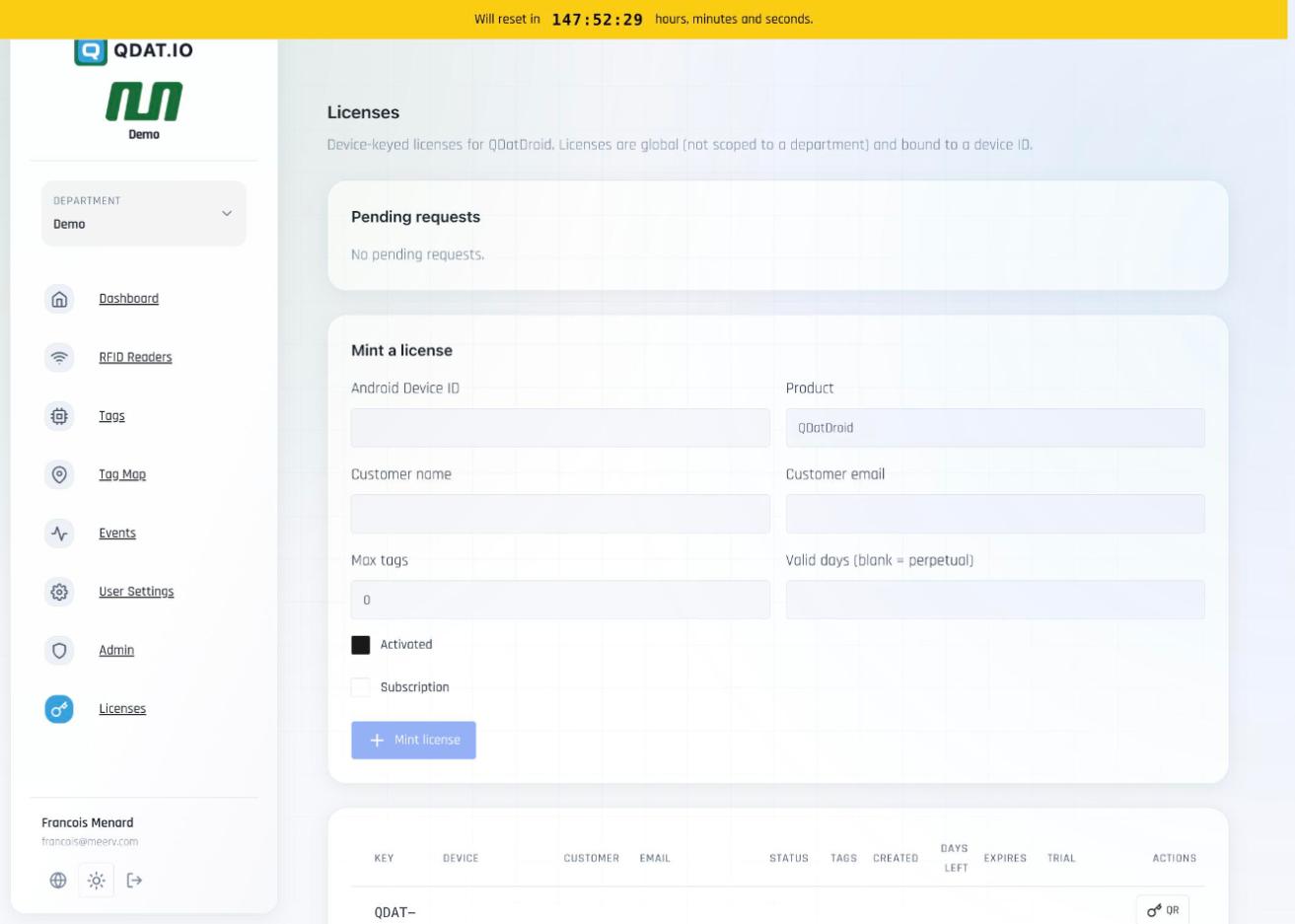
| Field | Description |
|---|---|
| Android Device ID | Unique hardware ID of the Android device to be licensed |
| Product | QDatDroid (current product) |
| Max Tags | Maximum tag count allowed under this license (0 = unlimited) |
| Valid Days | License duration in days (leave blank = perpetual) |
| Subscription | Flag for recurring subscription-type licenses |
| Actions | View QR code for device onboarding · Extend +30 days · Revoke |
Section 10
Technical Architecture
Key technology components as observed directly in the live platform.
📻
RFID Standards
UHF EPC Gen2 (ISO 18000-6C) and NFC (ISO 14443). Fixed infrastructure and mobile handheld readers both supported.
📡
MQTT Connectivity
MQTT protocol for reader-to-cloud communication. Readers connect via TCP/IP; broker handles real-time event streaming to all subscribers.
🔋
Axzon OPUS
Battery UHF RFID datalogger (4.09V). Logs temperature autonomously on-chip at configurable intervals; full log uploaded on next RFID scan.
🗺️
Leaflet Maps
Leaflet.js + OpenStreetMap tiles. Cluster-based rendering handles thousands of tag positions efficiently.
🔌
REST API
Full REST API with interactive Swagger/OpenAPI explorer. API tokens issued and managed via System Administration.
🏢
Multi-tenancy
Department-scoped data isolation. Tags, readers, events, and DPP records are all scoped and switchable per department.
| Component | Details |
|---|---|
| Platform URL | tapdpp.qdat.io |
| Fixed UHF Readers | Zebra FX7500, Zebra FX9600 |
| Mobile Readers | QDatDroid (Android), ET401-NFC, TC22R |
| Temperature Tags | Passive UHF temp sensors · Axzon OPUS battery dataloggers (NuroVault-Opus template) |
| UHF Tag Chips | Impinj M730, M750, Monza R6 · NXP Ucode 8 · EM Micro · Axzon OPUS |
| Protocol | MQTT (reader ↔ cloud) + REST API (clients ↔ cloud) |
| Maps | Leaflet.js + OpenStreetMap |
| API Docs | Swagger/OpenAPI interactive explorer (Admin → System Administration → API Explorer) |
| Mobile App | QDatDroid (Android) — device-keyed license, appears as QDATDROID reader type |
| Auth | Username + password login · API tokens · IP ban protection against brute force |
| DPP Public URLs | https://tapdpp.qdat.io/<EPC> — one publicly accessible page per tag |
| Built by | Meerv |
QDat.io Desktop Dashboard
Native desktop app for Windows, macOS, and Linux · version 1.1.0
The QDat.io Desktop Dashboard delivers near feature parity with the web dashboard, in the ease of use of a dedicated desktop application. Its defining trait: 100% of its functionality is made accessible through the public QDat.io API. Everything you see and do in the desktop app is built on the same documented REST API.
That is a live demonstration of the integration opportunities: if you see it on the QDat.io Dashboard web interface, and you see it in the desktop app, then the same UX and UI can be brought into any WMS, ERP, or other software — because it all rides on QDat.io's comprehensive API.
QDatDroid — detailed report
Capabilities, technical highlights, and the full release-notes history of the Android client
QDatDroidv2.4.13
Android · RAIN RFID / NFC field reader client
QDatDroid turns a phone, tablet, or Zebra handheld into a RAIN RFID / NFC reader connected to the QDat.io plane — scan-to-provision, spatiotemporal event capture, and live MQTT publish, online or offline.
Capabilities
Everything QDatDroid captures in the field.
Multi-protocol RFID reading
- •UHF RAIN RFID via sled, handheld and tablet readers for long-range, high-throughput reads
- •Built-in NFC for close-range interactions and provisioning
- •Native Zebra RFID SDK support across the full device range
- •Sleds: RFD40, RFD40 Premium / Premium Plus, RFD4051, RFD90
- •Handhelds: MC33xR, TC53e, TC22R, EM45, WS50
- •Qualcomm Dragonwing QCM-6690: next-gen platform with on-device AI — TC501 / TC701 handhelds and the ET401, the first RFID-enabled tablet
- •1D/2D barcode scanning for hybrid workflows
Find any tag, instantly
- •Visual Tag Locate finder — one smoothed proximity curve flows blue → amber → green as you close in on the tag
- •Live signal chip plus a peak marker that never drops, so you always see your strongest read
- •Hands-free Auto-isolate locks onto the loudest tag automatically once it holds the lead for a few seconds
- •Adaptive antenna power recovers fast from saturated tags instead of freezing the radio
- •Optional log scale spreads out faint, low-signal detail when you're still far away
Asset management in the field
- •Sign in to your QDat.io account right from the app — or spin up an instant demo with one tap, no credentials needed
- •Snap photos with the built-in camera and attach them to any tag; on an RFD sled the upper trigger doubles as the shutter
- •View and edit full asset details on the spot — name, category, location, value, acquisition date and notes
- •Works straight from the tag's EPC, so you can update an asset without keeping it in the beam
Sensor integration
- •Temperature from sensor-enabled RAIN tags (Axzon Magnus / NuroVault)
- •Moisture sensing from compatible tags
- •Battery-assisted passive (BAP) sensor support
- •Live sensor readings streamed to QDat.io as they are captured
Spatiotemporal capture
- •Every scan stamped with precise GPS coordinates
- •Millisecond-accurate event timing
- •When / What / Where model for every tag read
- •Movement tracking as assets move through space over time
MQTT connectivity
- •Tag reads and sensor data streamed live to QDat.io
- •Local-first offline queue — capture continues when the network drops, then syncs on reconnect
- •Heartbeat protocol shows the device as a live reader on the dashboard
- •Bidirectional control — the platform sends commands and config back to the device
Tag provisioning & writing
- •NDEF writing of Digital Product Passport URLs and structured data
- •EPC encoding of UHF tag memory with canonical identifiers
- •Batch provisioning for deployment workflows
- •Read/write locks and passwords on commissioned tags
Built for the field
- •Clean Material Design Android interface
- •Dark and light themes that follow the device
- •Multi-language interface
- •Configurable capture workflows for different operations
- •Offline maps to view asset locations without connectivity
Technical highlights
ArchitectureLocal-first with reactive data flow; survives connectivity loss without data loss
ProtocolsUHF RAIN RFID (EPC Gen2 / ISO 18000-63), NFC (ISO 14443 / 15693), MQTT over WebSockets
ReadersZebra sleds (RFD40, RFD40 Premium / Premium Plus, RFD4051, RFD90), handhelds (MC33xR, TC53e, TC22R, EM45, WS50), Qualcomm Dragonwing QCM-6690 devices (TC501 / TC701 handhelds, ET401 — first RFID-enabled tablet). Also features integrated Android NFC enabling QDatDroid to run on any Android phone or tablet with NFC integrated.
SecurityTLS-encrypted transport, tag-level read/write locking
Release notes
Full history · 86 releases, newest first.
Maintenance release — no user-facing changes since 2.4.12.
Fixed
- •Multimodal scan messages are now visible. Status messages during a multimodal scan (RFID captured, code/text added, scanner starting up, etc.) used to appear behind the scan window — they now show on top of it.
Changed
- •The multimodal scan no longer fights the RFID reader. Opening a multimodal scan now stops the running RFID inventory, and the hardware trigger no longer starts an RFID scan while you're in the multimodal window. To capture an RFID tag there, use the on-screen RFID button. (The imager/barcode trigger still works as before.)
Changed
- •More reader actions now require a connected RFID reader. OPUS Arm and Read Memory join OPUS Status, Read Logger, Locate, Modify Memory and the EM4425 DPP URL actions in showing "Connect an RFID reader to use this" when no reader is connected. NFC and camera features are unaffected.
Changed
- •Reader actions are now clearly unavailable without an RFID reader. OPUS Status, Read Logger, Locate, Modify Memory, and the EM4425 Read/Write DPP URL actions now tell you to "Connect an RFID reader to use this" if no reader is connected, instead of failing partway through. NFC and camera features are unaffected.
Fixed
- •The RFID reader no longer gets stuck after a reboot. On the TC22R the built-in RFID radio takes a few minutes to start up after the device powers on, and connecting before it was ready used to leave the app unable to connect until you force-closed and reopened it. The app now recognises this and shows a countdown telling you how long until the radio is ready, with a Close app button — reopen when it says ready and it connects on the first try. The estimate gets more accurate for your device over time.
- •The barcode/imager scanner tells you when it's still starting up. Right after a reboot the scanner (DataWedge) also needs a short while to be ready; scanning too early now shows a brief "scanner still starting up — ready in ~N seconds" message instead of doing nothing.
- •NFC and camera modes keep working immediately after a reboot — they don't depend on the RFID radio or the barcode scanner, so they're available right away.
Fixed
- •Connecting right after a reboot now works. When the device has just started up, the RFID radio and the barcode scanner (DataWedge) aren't ready for a few seconds — so connecting used to fail and you had to try again. The app now waits for them to come up and connects automatically once they're ready.
- •Barcode / imager trigger works after a reboot. The scanner settings used to be lost if they were applied before DataWedge had finished starting; the app now waits until DataWedge is ready before configuring it.
Fixed
- •OPUS Status / Read Logger now show the live temperature, battery and on-chip RSSI again on the TC22 reader. A change in 2.3.4 (meant for other readers) had stopped the tag from taking its on-demand measurement on this device, so it was showing stale values — that's fixed.
- •Published temperatures are clean — no more long decimal tails like
21.190000534…; temperatures are sent rounded to two decimals (21.19).
Changed
- •Read Logger status screen — the Temperature card now shows the value on one line (less wasted space), and the alarm-violation log at the bottom is scrollable.
Changed
- •"(1D/2D) + photo" — the "Scan barcode + photo" button is renamed, and now has its own light toggle (the sun icon) just like "1D / 2D by imager". The two light buttons stay in sync, so you can turn the imager's light on or off from either one.
Multimodal photos now travel inside the scan message itself, a new "Scan barcode + photo" capture, and a more reliable "Add RFID tag".
Added
- •Scan barcode + photo. A new button on the multimodal scan: frame the item, pull the scan trigger, and it captures the barcode and a photo together.
Changed
- •Photos are sent inside the scan, no upload needed. Multimodal pictures are now a small black-and-white image carried inside the scan message itself — no cloud login or upload, so they always go through. (Pictures are low-resolution, up to 640×480, to keep the message small.)
- •"Add RFID tag" wakes the tag first. It now gives a sleeping temperature tag a moment to wake up before reading it, so it picks up the tag more reliably.
Removed
- •"Add image" button. Photos now come from "Scan barcode + photo".
Multimodal scan polish — "1D / 2D by imager" now shows a live viewfinder and scans hands-free, text capture (OCR) works on any Zebra device, and the capture list became a tidy scrolling log.
Added
- •Imager light toggle. A sun button next to "1D / 2D by imager" turns the imager's light on or off, and it remembers your choice.
- •Live capture log. The top of the multimodal dialog is now a compact scrolling list that flashes each new capture, so you can review everything you've added at a glance before publishing.
Changed
- •"1D / 2D by imager" shows the viewfinder and scans hands-free. Aim at a 1D or 2D code and it decodes and returns on its own — no trigger pull — and the code is labeled 1D or 2D.
- •Capture text (OCR) now works on any Zebra device. It reads printed text with the built-in camera (on-device, no extra license) and shows you the recognized text to confirm before publishing.
- •The publish confirmation counts every capture in the bundle (matching the list), not just the kinds of capture.
Fixed
- •Codes captured with "1D / 2D by imager" that previously showed as "?" are now correctly labeled 1D or 2D.
Multimodal scan — capture an RFID/NFC tag together with barcodes/QR codes, photos and OCR text in one bundle — plus a barcode/QR inventory you can run continuously on the device's built-in imager with no RFID reader connected.
Added
- •Multimodal scan. Capture one physical thing as a single record: start from any mode — an RFID or NFC tag, a 1D/2D code, or a picture — then add the others in any order (camera or device imager for codes, a photo, OCR text). GPS and timestamps are attached automatically and the whole bundle is sent as one message, so the cloud sees one scan instead of separate pieces to stitch together.
- •Barcode / QR inventory with no reader. Press Start when no RFID reader is connected and the device's built-in imager scans 1D/2D codes continuously — each code lands in the list like a tag (with a running count and GPS) and is published over MQTT. Scanning stays automatic until you press Stop — no need to pull the trigger for each code. (Requires a Zebra device with DataWedge.)
- •Capture text with OCR and capture an image with the imager as part of a multimodal scan — read a printed serial, lot or label, or grab a scene/document photo, using the device imager instead of the camera app.
Fixed
- •Scanned codes are logged instead of being typed into the search box. On the no-reader barcode path, decoded codes now go straight into the inventory list (and MQTT) rather than being typed into the focused EPC filter field, and the device-imager barcode capture in multimodal scans now works reliably.
Tag Locate and OPUS support on the built-in readers (TC701/TC22R and EM45), plus connection and status-indicator polish.
Added
- •OPUS temperature-logger tags can now be located on the built-in readers. Tag Locate (the hot/cold proximity screen) tracks OPUS tags on the TC701/TC22R and EM45 built-in radios, with a proximity curve that holds steady while the tag is near and only drops when it actually leaves.
- •GPS and NFC status indicators on the top bar. GPS shows green when on — with a blinking Fixing → steady Fixed sub-label, or No GPS / Override — and grey when off. NFC is grey unless active, then green.
- •A live debug log on the Locate screen. Swipe right on the Locate screen to see a live log (when the debug overlay is turned on in App → General settings), the same as the main screen.
Changed
- •Read Logger is clearer. The wake-up and reading steps are now one consistent panel that shows which step is running (Reading OPUS logs …, with progress), and it jumps you to the Logger Data tab when the read finishes. The Configuration tab is now just Config.
- •Asset-picture buttons now appear during your trial and whenever MQTT is set up, not only on paid tiers.
- •The "Fast EPC-only inventory" setting was renamed and reworded to explain that it gives a smoother Count and faster locate on the built-in radios.
Fixed
- •Tag IDs (EPCs) ending in zero are no longer cut short when scanning.
- •The "Select RFID Reader" menu now closes once you connect — including when you pick the built-in reader after a Bluetooth reader fails or isn't present.
- •Cancelling a Bluetooth connection brings you back to reader selection right away, instead of waiting out the connection retries.
- •The GPS button turns green again when you re-enable GPS from settings.
- •Antenna power is only re-applied when you change it (a mode change, or moving the power slider) — never repeatedly during a scan or locate.
Changed
- •The detailed list view shows more useful tag information by default.
Locate-screen polish following the built-in-reader locate work.
Changed
- •The Locate radar and proximity scale are tuned to the signal range the readers can actually read, so the meter, zone lines and radar rings all use the full useful range instead of wasting space on signals too weak to read.
- •The proximity beep is now audible on enterprise handhelds — it previously used a sound channel those devices often silence.
- •Beeper volume is now a clear four-choice control — Quiet, Low, Medium, High — instead of a drop-down.
Added
- •Tag Locate (hot/cold proximity) now works on the built-in TC701/TC22R reader, not just the Bluetooth sled. The Bluetooth sled locate is unchanged.
Fixed
- •Removed a false "reader unresponsive" reconnect that the built-in radio could trigger while locating.
Added
- •Set up a brand-new (or factory-reset) reader right in the app. When a reader has no region, QDatDroid now asks you to pick the region and channels (instead of failing or guessing). After you choose, it writes the setting, waits while the reader reboots (~30 seconds), and reconnects on its own. There's also a Factory Reset Reader button under Reader Info → General.
- •Tag links open inside QDatDroid. Tapping a tag's URL opens an in-app browser with a "Return to QDatDroid" button at the bottom, so you always know you came from the app. URLs are now tappable links in both the card and list views.
- •"No sound" in the ⋮ menu instantly mutes the scanning beeps.
Changed
- •The tag action buttons are now identical everywhere — the card, the detailed list, and the bottom action bar show the same buttons, names and colours (Isolate, Locate, OPUS Status, Read Logger, OPUS Arm, Read Memory, Modify Memory, EM4425 Read/Write DPP URL, Asset picture/Show/Modify, …). On the card they wrap onto multiple rows so nothing is hidden, and Isolate is bright fluorescent green.
- •The reader picker shows the Bluetooth name, serial and MAC, marks readers you've used before with a ⭐, and the connected-reader/disconnect screen shows full reader detail.
- •Card tag EPC shrinks to fit one line; the filter box shows the whole EPC; the Locate screen's stop button just says STOP.
Fixed
- •The "EM EM4425" tag badge now reads EM4425.
- •RF Mode selection no longer fails with an error when you pick a different mode.
- •The trial sign-up no longer pops up over the splash screen — it appears only when you set up MQTT.
Fixed
- •The "License" tab in Settings now opens the License page. Tapping the License tab could jump you to the History tab instead. The tab selector now switches instantly to the tab you tap, so License (and every other tab) opens the right page.
Clearer handling when the built-in reader can't start because the handheld is charging.
Improved
- •The reader reconnects on its own once you unplug. On devices with a built-in RFID radio (such as the TC701), the radio can't start while the handheld is charging. Instead of just failing, the app now tells you to unplug the cable or take the device off its charging cradle — and reconnects automatically the moment power is removed, so you don't have to tap retry.
- •A clearer message when nothing is plugged in. If the device still reports that it's charging even though no cable or cradle is connected, the app now recognises this stuck state and tells you to reboot the handheld to clear it — instead of repeating "unplug the cable" when there's nothing to unplug.
- •An easy-to-read pop-up you can act on. This warning now appears as a pop-up you acknowledge, instead of a banner that vanishes in a few seconds. It walks you through clearing a false "charging" state — plug the USB charging cable in and then unplug it — and includes a Retry button. Once you remove the cable the reader reconnects on its own and the pop-up closes automatically.
Note
- •The "charging" block is a device-firmware issue, now reported to Zebra. On the TC701 the built-in reader can refuse to start because the handheld reports it's charging even when it isn't. We've documented this in detail and reported it to Zebra; the changes above make the situation clear and recoverable while we await a platform fix.
Support for the RFID reader built into your handheld, the ability to lock in a radio mode that's remembered between sessions, and a few layout clean-ups.
Highlight
- •Cooltags armed on the TC701's built-in reader. We demonstrated arming Cooltags directly with the TC701's internal RFID radio (no external sled) using RF Mode 4 — and that chosen mode is now remembered, so every time you reconnect the reader comes back on the same setting.
Added
- •Use your handheld's built-in RFID reader. On devices with an integrated radio (such as the TC701), the app now finds and connects to it automatically, and correctly shows it as e.g. "TC701 Built-in RFID" over "QC Serial/USB" — instead of failing to start or showing "Unknown RFID Reader".
- •Choose and save your RF mode. In Reader Info → RF Modes, tap any mode to select it. Your choice is saved and reapplied every time you connect, so you always know which mode you're running. A green ✓ Selected badge marks your saved mode, and Use Auto (Best Match) returns to automatic selection at any time.
Improved
- •App name and version both fit again. On the Enterprise edition the title no longer hides the version number beneath it.
- •Clearer scan counters. The counters in the top-right now show Tags, reads-per-second, and Total each on their own line.
- •More room for tag details. In the single-tag action bar, button icons now sit to the left of their labels (instead of above), making the bar shorter and leaving more space for the tag details.
A cleaner temperature chart and a fix for getting stuck after viewing a logger read.
Improved
- •The temperature chart now fills the screen. In Read Logger → Logger Data → Chart, the graph used to sit squished at the top of its card with a big empty gap underneath. It now expands to use the full height, so the temperature trend is much easier to read.
- •A stray red square is gone. A small red box used to appear just above the Min statistic under the chart. It was a leftover legend mark with no purpose — removed. Your Min / Avg / Max still show in the panel below the chart.
- •The from: / to: times follow your zoom. As you pinch-zoom or drag the chart, the from: and to: timestamps now update live to match exactly the window you're looking at (and still switch correctly with the Local Time checkbox). They had been freezing after the data first loaded.
Fixed
- •"Start" works again after closing a logger read. After opening Read Logger (or OPUS Status) and closing it with the ✕ or Stop button, pressing Start on the main screen could do nothing and report *"inventory already running"* — even though scanning had actually stopped, leaving you unable to resume. Start now reliably begins a fresh scan again.
ControlTek customer build (branding/packaging only — no changes to how the app behaves).
A tougher, more dependable reader. This release focuses on recovering gracefully when the RFID reader stops responding, and on getting your antenna power exactly back where you left it after viewing a tag.
Improved
- •The reader recovers on its own. If the reader ever stops responding to commands (a "wedged" state that used to require closing and reopening the app), QDatDroid now detects it quickly and automatically reconnects — no restart, no endless "Start does nothing." If a reconnect can't fix it, you'll get a clear prompt.
- •Antenna power is restored exactly — and verified. After you view a tag in Read Logger or OPUS Status, your antenna power is put back to your setting and double-checked by reading it back from the reader — not just assumed. If the radio is briefly busy it keeps trying, and it re-applies your power on the next scan as a safety net, so you never end up scanning at a reduced power by accident.
- •Set the power yourself in Read Logger. Opening the power slider and tapping Apply now sticks — the automatic power adjustment steps aside and keeps your chosen value.
- •Closing a logger read stops immediately. Pressing Stop while a logger download is running now aborts within a moment instead of finishing the whole download in the background.
- •OPUS Status is steadier. It no longer occasionally freezes on its first reading, the loading message now reads "Reading tag status…", and a finished tag's status reads more reliably because it waits for a clean signal first.
- •The tag list stops flickering. Tags that briefly drop out of range are no longer removed and re-added so eagerly — a tag has to truly be gone before it disappears, and the list updates more efficiently.
- •Detailed (table) view tidied up. Sensible default column widths and text size, the temperature chart fits properly (the local-time row no longer gets pushed off screen), and below/above alarm counts sit on one line.
- •A hidden diagnostics view for support. Field techs can enable Settings → General → Developer → "Debug log (swipe right)" to swipe in a live activity log for troubleshooting. It's off by default.
A smoother first launch and a friction-free trial: connecting your reader no longer stumbles over Bluetooth permissions, and trial users can attach photos and asset details without any extra setup.
Improved
- •Reader connects cleanly on a brand-new install. Previously, launching the app for the first time could show a Bluetooth error before you'd even tapped Allow on the permission prompt. Now the app waits for the permission and connects to your Zebra reader as soon as it's granted. If Bluetooth access is ever missing, you'll see a clear "Zebra RFD Bluetooth Failure" message instead of a cryptic technical one.
- •Trial photos & asset details just work. On a trial, adding a photo to a tag or opening an asset record no longer asks you to "set up API access in Settings" first — the app provisions your demo cloud access automatically the moment you need it.
- •The single-tag buttons stay put when you isolate a tag. Once you isolate a tag, the action buttons (Locate, Read Logger, OPUS Status, ARM, Modify Memory, EM4425) now stay on screen for the whole session — even if the tag briefly drops out of range — and re-find the tag for you when you tap. Clear the filter to release.
- •Reading a tag no longer changes your reader power. Opening OPUS Status or Read Logger could leave the antenna power lowered afterward; the app now remembers your power and restores it when you return to the main screen.
- •ARM and Reset are quicker and don't hang. They now wake the tag first, so they start instantly instead of waiting on a long timeout, and tell you right away if the tag is out of range.
- •Smarter automatic reader power on OPUS tags. While viewing live OPUS data, the app tunes antenna power to keep the sensor in its best range — now settling in about a second, holding steady instead of hunting, and never dropping so low that the tag stops responding.
Moved
- •Auto-isolate loudest tag now lives under RFID Settings → Antenna (previously in General Settings).
Tidier
- •Refreshed the colors of the isolated-tag action buttons (Locate, Modify Memory, Asset Picture) for quicker recognition.
Licensing comes to QDatDroid: request a trial or a full license right from the app, activate it, and arm tags up to your licensed allowance — with a cleaner, QDat.io-branded setup screen.
Licensing & trials
- •Request a trial or a license in the app. Open the QDat.io cloud on the main screen (or the License settings tab) and choose Request 30-Day Trial or Request License. Enter your name and email, tap Submit, and the app handles the rest. Your Android Device ID is what identifies this device to QDat.io.
- •One scan sets everything up. Scan the QR code from your QDat.io account and the app provisions MQTT and activates your license in a single step — no separate setup.
- •Tag allowance. Your license grants a number of OPUS tags you can arm. The License tab shows "Tags: N left of M"; once you've used them all, arming is paused and you're prompted to get more.
- •Refresh License. Tap Refresh License to pull your latest entitlement from QDat.io — handy after your allowance has been increased, so you can arm more tags.
- •Check on a request. If your license request is awaiting fulfilment, the app remembers it: the menu reads Check on License Request and the License tab shows your request with the next step (log in to QDat.io, then Scan QR).
- •Manage it. The License tab shows your License No. and a clean expiry date (e.g. *1 Jul 2026*), and has a Delete License & MQTT Credentials button to reset the device.
Setup screen
- •The main-screen cloud now shows QDat.io Setup with the QDat.io logo when nothing is configured, and the setup menu is a tidy list of buttons — 1-Day Trial, Request 30-Day Trial, Request License, Manual (Enterprise), Cancel — each highlighting as you tap it.
Fixes
- •Submitting a license request now correctly shows the activated license instead of re-opening the form.
- •In detailed-list view the RSSI and Cnt column headers no longer wrap onto two lines, and columns line up with their headers.
- •Fixed an MQTT reconnect crash; NFC URLs span the full row in detailed view and NFC mode is kept when switching between card and list views.
Connect QDatDroid to your QDat.io account to attach photos and asset details to tags, plus hands-free auto-isolate of the closest tag.
Asset management (QDat cloud)
- •Sign in to QDat.io from the app. A new API Access settings tab lets you connect to your QDat instance. Either tap Start TapDPP Demo (no username or password needed — a temporary demo account is created for you) or sign in with your email and password and pick your organization (the department where your reader was registered).
- •Photos and asset details on every tag. Isolate a tag and a new row of buttons appears:
- –Picture — snap a photo with the built-in camera and attach it to the tag. On an RFD sled, the upper trigger works as the shutter.
- –Show — view the tag's pictures (swipe left/right), all its tag information, and its inventory times (with a Local/UTC time switch).
- –Edit — change the asset's details (name, category, location, value, acquisition date, notes…) and delete photos. A date picker and number keypad keep entries valid.
- •These work even if the tag isn't currently being scanned — the app uses the EPC in the search box.
Auto-isolate the closest tag
- •New Auto-isolate loudest tag option (Settings → General, off by default). While scanning, the app automatically isolates the nearest tag (strongest signal) once it stays the loudest for 3 seconds. Clear the search box to release it.
A quick polish on the Tag Locate graph after 2.0.16.
Tag Locate graph
- •New "Log" checkbox in the footer (next to "Smooth"). When ticked, the right-axis scale switches to a logarithmic shape — low-signal detail in the 0–10 % range gets the bottom half of the chart instead of being squashed into a few pixels at the bottom. The axis labels still read 0 to 100; only the visual spacing changes. Default off, remembered between sessions.
- •The right-axis tick marks no longer slide. They stay anchored at fixed positions instead of zooming in and out around the live signal. The label numbers stop jumping around as the signal changes.
- •The big percentage chip moved to the top-center of the chart (was top-right). It no longer competes with the right-axis numbers for screen space.
Supported Zebra hardware
- •Documented the Zebra readers QDatDroid runs on. QDatDroid uses Zebra's RFID SDK version 2.0.5.275, which supports the RFD40 / RFD40 Premium / RFD90 Bluetooth sleds, the new RFD4051 sled, and integrated-RFID devices like the TC22R, TC53e, EM45, WS50, MC33xR, ET6X, FXR90, FXP20, and the newly added ET401 / TC501 / TC701. See
docs/ZEBRA-SDK-2.0.5.275-DEVICES-EN.mdfor the full list and the Android-version requirements per device. - •Looking ahead — RFID built into the chip. The same doc now covers Qualcomm's new Dragonwing Q-6690 processor (launched 2025, a CES 2026 award winner), the first enterprise mobile chip with a UHF RFID reader built directly into the silicon. Zebra is already a named adopter, so future Zebra handhelds could run QDatDroid and read tags with no Bluetooth sled at all — one device, no pairing, and cheaper hardware. Background reading for where the hardware is heading.
- •Looking ahead — on-device AI. The doc also explains the chip's 6 TOPS AI engine in plain terms and how a future QDatDroid would use it: running food-quality prediction and cold-chain excursion alerts right on the handheld — working offline, instantly, with your data never leaving the device — instead of waiting on a cloud call.
The Tag Locate graph gets a full visual redesign, OPUS Arm and Read Logger handle saturated tags much better, the battery voltage stops flickering, and the reader icon no longer lies about being disconnected.
Tag Locate graph — full redesign
- •The Locate Tag graph is now built around a single hero curve that's
- •much easier to read at a glance:
- •One smoothed colored curve instead of the previous two-line technical chart. The line bends through a vertical blue → amber → green gradient so the color of the area under the curve already tells you how close you are.
- •Big floating "NN%" chip in the top-right corner of the graph shows the live signal level. The chip's border tracks the proximity color (cold → warm → green) so you don't even have to read the number.
- •"Peak NN%" line in green slides up to mark the strongest signal you've seen in this session. It never moves down — so as you sweep the wand you can see how close you got at your best moment.
- •Four faint dashed zone lines ("Far / Medium / Close / Very Close") are anchored on the right axis so you always know which zone you're in without having to translate raw numbers.
- •X axis now shows seconds elapsed ("5s", "6s", ...) so you can see how long you've been searching.
- •800 ms entrance animation when the dialog opens.
- •"Smooth" checkbox next to "Beep" (default on) — turn it off if you want to see every raw spike. Smoothing dampens individual reads so the curve flows instead of zig-zagging.
OPUS Status / Read Logger
- •Better behavior when a tag saturates the antenna (OCRSSI = 31, the chip's signal detector is pinned). The dialog now drops the antenna power straight to roughly 15 dBm and then climbs back up fast (about 4× faster than before), targeting a quieter signal level so it doesn't immediately re-saturate. Previously the dialog would slam to the bottom of the power range and crawl back up so slowly the radio felt frozen.
- •Battery voltage display no longer flickers. The displayed value is now a 10-second rolling average instead of the raw per-tick reading, so small thermal noise in the chip doesn't rock the last two decimals every second. Real battery drift over the session is still tracked normally.
- •Power climbs back automatically on read errors. If the periodic refresh hits a "no response from tag" error, both the Read Logger and OPUS Arm refresh loops now bump the antenna power back up by four steps so the next refresh tick has a better chance of getting through. (Read Logger already did this; OPUS Arm now matches.)
OPUS Arm dialog
- •LED on-time / off-time controls are always visible instead of appearing/disappearing as you tick the "Enable LED" checkbox. Unchecking the box fades the spinners and disables them; the controls stay in place so you can see the configured values without toggling the checkbox.
- •"OPUS Arm — N/A Logging" affordance on the tag-row action bar and the long-press menu. When a tag is actively logging the ARM button is shown disabled with text "N/A Logging" instead of just disappearing, so you can see at a glance why the action isn't available.
Reader connection
- •The reader icon no longer turns red when the radio is actually connected. After a theme change, screen rotation, or coming back from another screen, the icon could end up red even though the reader was still working. The status indicator is now kept in sync with the actual radio state across all activity transitions.
A short polish pass — three small fixes on the main-screen contextual menu and the inline action bar.
The long-press menu stays put while inventory scans
- •When you long-press a tag during inventory, the popup menu used to jump around because each new tag read re-rendered the list and shifted the row your menu was attached to. The list is now frozen while the menu is open — your menu stays exactly where you long-pressed. On dismiss, the list resumes and snaps to its current state in one redraw.
- •Trade-off: row contents (RSSI, count, sort position) freeze for the menu's lifetime. The radio keeps reading; only the display is paused until you close the menu.
Modify Memory now behaves like the other tag actions
- •Modify Memory now stops inventory cleanly and wakes up the tag before opening the write dialog (it used to skip both, which could make the first write attempt fail with "no response from tag").
- •The Modify Memory dialog no longer auto-restarts inventory when you close it. Like Read Logger, Locate, and OPUS Status, the dialog leaves inventory stopped and you restart it manually via the Start button on the main screen.
Cosmetic
- •EM4425 DPP Write button is now purple (was orange). Sits next to EM4425 Read URL in the inline action bar's second row; the purple matches the existing OPUS-purple in the palette and visually separates the EM-specific actions from the generic warning-toned ones.
A tidy-up of the OPUS tag screens. OPUS Status and Read Logger are now two clearly different tools.
OPUS Status is now a true read-only view
- •OPUS Status no longer downloads the temperature log on open. It used to share the Logger Data tab with Read Logger and auto-pull samples, which made the two screens look identical. OPUS Status now shows only the Status and Configuration tabs — current tag state on the left, configuration on the right, no log pull.
- •New "Logger Status" popup entry on any OPUS tag (any state). Same read-only view as the inline OPUS Status button, accessible from the long-press menu. Sits above "Read Logger" so it's the first option a user reaches.
Read Logger is unchanged in spirit, faster in practice
- •Read Logger keeps all three tabs (Status, Logger Data, Configuration) and still auto-downloads the log on open as before.
- •Read Logger now works on full / FINISHED tags again. A 2.0.13 fix accidentally broke the download for tags that had filled every slot — the dialog would silently refuse to read. Full tags now download correctly.
The instantaneous temperature on the Status card refreshes every second
- •Both screens (Read Logger and OPUS Status) now refresh the instantaneous temperature reading on the Status tab every second (was every four seconds), and the displayed number is the raw fresh read rather than a 5-sample rolling average. Live temperature tracking on a full tag is now visible instead of effectively frozen.
Other tidy-ups
- •"Exit to Main Screen" button removed from the Configuration tab. The dialog already has a bottom Stop button and the close-X in the toolbar; the per-tab Exit button was redundant.
- •OPUS Status periodic refresh now reliably runs every time you open the screen. A bug where the refresh would stay silent if you had previously opened (and dismissed) the Read Logger dialog is fixed — the state flag that controlled it wasn't being reset between dialogs.
- •The "OPUS instant temperature" auto-read during inventory now defaults to off (it was already documented as off-by-default but silently ran in-memory until the user's preference loaded). If you want the live-temperature column in the main tag list, the toggle is still in RFID Settings → General → "Read OPUS instant temperature".
Tag Locate — "TOO CLOSE" only when you actually are
- •Fix for the false "TAG NEARBY — TOO CLOSE TO READ" banner. In 2.0.12 the banner could appear at moderate distances (RSSI in the -50 to -70 dBm range) because the proximity tracker held its highest reading from earlier in the session — once it saw you near the tag once, it kept thinking you were near even after you backed off. The banner now responds to your *current* distance: it only appears when reads go silent and the last read was actually strong (close range). At medium distance, the bar drops naturally and the banner stays hidden.
A focused cleanup release. Six small-to-medium fixes that landed across the day plus a Tag Locate UX overhaul tonight.
Tag Locate — finding tags now actually works
- •"TAG NEARBY — TOO CLOSE TO READ" banner. When you get right up to a tag the reader's antenna saturates and stops getting signal — which used to look identical to "the tag is gone": the proximity bar would collapse to zero just as you found the tag. The locate dialog now recognizes this and shows an orange "TAG NEARBY — TOO CLOSE TO READ" banner under the title, holds the bar at its last reading instead of dropping it to zero, and clears the banner the moment a real read returns when you back off slightly.
- •Recovery from the close-range silence. Even after you back off, the tag stays radio-silent for 15–20 seconds because of EPC Gen2 session persistence (a low-level tag/reader protocol behavior). The locate dialog now detects that silence and automatically cycles the inventory after 3 seconds, which clears the session state. Signal resumes within a few hundred milliseconds instead of waiting out the whole 15–20 seconds.
- •Locate works on the first press. When the tag was isolated into the display filter, hitting the inline Locate button used to do nothing — you had to first hit Start, then Stop on the main inventory bar to "wake up" the SDK before Locate would work. Locate now runs the same brief SELECT wake-up sweep as Read Logger / Read Memory / EM4425 Read URL, so the first press lands on the tag every time.
Read Logger — no more bogus "256 samples"
- •"256 samples" report on freshly-armed tags is gone. A tag that was just armed and hadn't yet logged its first sample would report "Reading complete: 256 samples" — the dialog was speculatively reading 256 zeroed slots and counting them as real data. It now shows the honest count (0) with a snackbar "No samples logged yet — try again after the next logging interval". The auto-refresh catches the first real sample as soon as it lands.
Settings — LED On / LED Off rows align
- •Profile editor LED On Time and LED Off Time rows now align. The two labels became "LED On Time / (milliseconds)" and "LED Off Time / (seconds)" on two lines so the spinners next to them line up vertically. Previous version had one label on one line and the other on two, so the dropdowns were staggered.
Behind the scenes (from the earlier day)
- •These six fixes were merged across the day before tonight's session;
- •all ship together as 2.0.12.
- •Stuck-radio recovery on disconnect. When the Zebra radio got into a stuck state (persistent "operation in progress" or radio timeouts), tapping the in-app disconnect/reconnect didn't fix it — you had to force-quit the app. The SDK is now fully reset on every disconnect, and the existing triple-Stop recovery gesture picks up the same fix for free.
- •Column widths and font size in the tag table now persist. Adjustments to column widths and the table font size used to vanish on every app restart. Now they're saved like every other table preference.
- •No more "disco" flashing in card view. When two tags were both in range, their rows would swap positions every refresh because the sort used the "last seen" timestamp, which gets rewritten on every read. Card view now uses a stable "first seen" timestamp, so rows hold their discovery order regardless of re-reads.
- •OPUS Status is now a clean read-only view. The Read button in the single-tag inline action bar was renamed to "OPUS Status" and now always shows the read-only Status + Logger Data view. Before, if the tag wasn't yet armed, OPUS Status silently dropped you into the ARM dialog — confusing if you were just checking.
- •Dedicated ARM button on the single-tag inline action bar. When the table view is narrowed to one tag, Row 1 now reads Locate · Read Logger · OPUS Status · ARM (was 3 buttons; now 4, one dedicated to arming). The ARM button is hidden on actively-logging tags so you can't accidentally re-arm one mid-flight.
- •Tag list row buttons fit. Renamed "EM4425 URL" to "EM4425 Read URL" to pair with the existing "EM4425 DPP Write" action; Row-2 button labels now use a slightly smaller font so the longer text doesn't clip or wrap to two lines.
EM4425 NFC + UHF dual-radio tag support — read and write NDEF URLs from the UHF side, see them in the tag list, and watch them ride MQTT. Plus a quality-of-life pass on the main screen for single-tag flows, and a full overhaul of MQTT Settings and Tag Locate carried in from the in-progress 2.0.10 work.
EM4425 NDEF URLs (the headline)
- •"EM4425 URL" action on any UHF tag (long-press popup + inline action bar) reads the NDEF URL stored at USER memory offset 0xA0 — the same region your phone's NFC reader can see. The URL is cached on the row, surfaces under the TID, and starts riding every MQTT inventory broadcast for that EPC.
- •"EM4425 DPP Write" action writes the hard-coded URL
https://tapdpp.qdat.io/<EPC>into that same NDEF region. The written URL is then visible to any NFC-capable phone with a tap. Uses a pre-clear pattern (zeros the region first) because the EM4425 silently fails to overwrite existing data in one shot. - •UID display order fixed for NFC Type V (ISO 15693) rows. The row label now shows the printed / MSB-first form instead of the wire / LSB-first bytes.
Read Memory now works on any tag
- •Read Memory is no longer OPUS-only.
- –OPUS tags continue to open the OPUS Status / ARM dialog as before.
- –Non-OPUS UHF tags open a new full-screen UHF Memory Bank Browser showing EPC, TID, and USER banks as a labeled hex+ASCII dump, with the chip type (Impinj M730, EM EM4425, etc.) shown in the header.
- –NFC tags open a new NDEF Browser showing UID, tag type, manufacturer hint, and the cached NDEF URI record.
Single-tag inline action bar
- •When the visible list is narrowed to exactly one tag in list (table) view, a 2-row bar of equally-sized buttons appears above Start/Stop/Clear: Locate · Read Logger · Read on row 1, Modify · Open URL · EM4425 URL · EM4425 DPP Write on row 2. One-tap access to every per-tag action without long-pressing.
- •"Isolate" popup-menu entry copies a tag's EPC into the display filter — the list narrows to just that row and the action bar appears. Long-press any tag and pick Isolate to focus on it.
More reliable reads (especially after the first session)
- •SELECT wake-up sweep runs a brief inventory pass on the target EPC immediately before Read Logger / Read Memory / EM4425 URL / EM4425 DPP Write. This re-singulates the tag and lets the access read go through reliably — fixing the previously common situation where the second read on a tag failed with NO_RESPONSE after the first session had let the tag's session flag lapse.
- •"Out of range" snackbar replaces the old 10-second freshness gate. If the wake-up sweep can't see the tag in 2.5 s, you get an immediate "out of range" message instead of a 30-second NO_RESPONSE retry storm.
Trigger semantics
- •Hardware trigger during Tag Locate now stops the locate session (previously trigger leaked through and tried to start a second inventory on top of the locate's running inventory).
- •Hardware trigger during Read Logger continues to stop the read — and on dismiss, inventory now stays stopped instead of silently re-arming. Press Start (or the trigger) on the main screen to resume scanning.
NDEF URL line in the tag row
- •New
URL:line below the TID, in primary green, shows any captured NDEF URL — populated by NFC taps (NFC rows) or by the EM4425 URL / DPP Write actions (UHF rows). In list view the URL line spans the full row width so long URLs aren't truncated.
MQTT — URL travels with every UHF SCAN
- •Once an NDEF URL is captured for a tag (via EM4425 URL or DPP Write), every subsequent MQTT SCAN payload for that EPC includes a
urlfield — matching the shape NFC scans already use. The backend can now bind a singleurlcolumn across UHF + NFC scans of the same physical chip.
MQTT Settings (the big change)
- •New master switch at the top of the MQTT card — "MQTT Configuration: No / Yes". Flipping it OFF wipes your saved broker credentials so the next ON starts fresh at the Scan-QR-Code prompt. Flipping it back ON re-establishes the broker connection with whatever you've configured.
- •Scan QR Code and Qdat.io Demo are now side-by-side, half and half. Whichever method you used to set up the current connection is shown bright; the other dims so you can see at a glance which mode you're in. This choice persists across app restarts.
- •The "Receive Commands" checkbox is now "Ignore Remote Commands" and lives in Advanced Mode. Leave it unchecked (default) and your device acts on every command from the backend. Check it and the device silently ignores everything. There's also a per-command list below where you can drop individual command types (REBOOT, RESTART, GET_VERSION, etc.) instead of muting them all.
- •Status line moved above the Test Connection button so you can always see whether the broker is connected without scrolling. Turns green on connect, orange while connecting, red "Disconnected from broker" when you flip the switch off.
- •Test Connection is hidden in simple mode (it was redundant — the master switch and the Scan-QR / Qdat.io-Demo buttons already trigger a connect on save). Appears in Advanced Mode where it doubles as the apply-and-test button. In Advanced Mode, tapping it when you're already connected and nothing has changed no longer tears down and re-establishes the session — it just confirms "still connected".
- •Demo-mode indicator on the host line. If you provisioned through the Qdat.io Demo path, the host display shows "(TapDPP.QDat.io Demo Mode)" on a second line. If you scanned a QR code to the same domain, no tag — the indicator only marks deliberate demo sessions.
- •Cloud icon dialog now offers Try Demo too. Previously, the demo setup was only available when MQTT was disabled (the red-blinking icon). Now it appears in the connected-state info dialog as well.
Tag Locate
- •New "Mute the Tag Read beeper during locate" checkbox in App Settings → Tag Locate (default on). When you open the Locate dialog to find a specific tag, the regular tag-read beep gets silenced for the duration so the proximity beep isn't drowned out. Restored automatically when the dialog closes.
- •Proximity beep volume picker — Low / Medium / High. Saved preference. Defaults to Medium.
Settings UX polish
- •Tag-Read Beeper picker now actually remembers your choice. A bug was silently resetting the volume to Quiet on every cold start and Bluetooth reconnect; that's fixed. Whatever you set is preserved.
- •DND warning Toast — if you pick Medium or High but your device is in Do Not Disturb or silent mode, you get a one-line reminder that you may not actually hear anything. No new permissions used.
- •DataWedge integration checkbox ("Capture barcode scans into the EPC filter") now shows a short description of what enabling does when you check it.
- •Predict API settings save reliably. Earlier the URL and API key fields could lose your typed value if you tapped Back instead of Test. Now they auto-save on field exit. The Enable checkbox also takes effect immediately and no longer gets force-flipped on by the Test button.
Under the hood
- •The settings layout consolidates broker, Receive Commands, and topic configuration into a single MQTT card; the empty placeholder card that used to appear between Remote Commands and Batch Publishing in unified-topic mode no longer renders.
Changed
- •The cloud icon for unconfigured MQTT no longer blinks. Instead of flashing between a cloud and a question mark, it now shows a single steady red cloud with a question mark on it.
- •Release Notes moved into the About screen. Open About and tap "View Release Notes" to read this changelog — it's no longer a separate entry in the toolbar menu.
Fixed
- •MQTT command channel now opens reliably the first time you set up a broker connection, without requiring an app restart. Previously the app would connect to the broker and publish scans, but silently fail to subscribe to its command topic — backend replies piled up undelivered until you restarted. (Continuing improvements to the rearm logic that landed in 2.0.9.)
Changed
- •"Release Log" menu entry renamed to "Release Notes" in all 8 languages (English, French, German, Spanish, Italian, Japanese, Korean, Chinese Simplified).
- •The Release Notes screen now shows this user-facing changelog instead of the technical developer changelog. Entries focus on what you see and what changed for you, not on code-level details.
Added
- •Full history back to version 1.0.2 is now visible in the in-app Release Notes — every release from late 2025 through today, with a short summary of what each one brought.
Internal housekeeping release — no user-visible changes. (The in-app Release Log content for 2.0.7 was reorganized after a parallel-branch merge had duplicated some sections.)
New
- •Try Demo in one tap. When the cloud icon is flashing red, tapping it now opens a choice: pair via QR code (the existing path) or "Try Demo" — enter an email, and the app sets up a temporary demo cloud connection automatically. Demo option only shown on the Enterprise edition.
- •Release Notes in the app. A new "Release Notes" entry in the toolbar overflow menu opens this changelog right inside the app — no more hunting for what changed.
- •Encrypted cloud credentials. Your cloud username and password are now stored in the device's secure keystore. Existing setups are migrated automatically the first time you open the app after upgrading.
- •Faster first GPS fix. If another app on the device is already receiving location updates, scans get those coordinates immediately instead of waiting for the app's own GPS fix.
Changed
- •More reliable cloud connection.
- –Faster detection when the connection silently drops (revoked credentials, transient TLS failures).
- –The app now distinguishes "no network" from "broker unreachable" and shows a clear message in each case.
- –When credentials are rejected, you get a snackbar telling you to re-pair via QR — instead of the app retrying forever in the background.
- –Duplicate uploads from a flaky link are deduplicated before they reach the queue, so a single tag scanned during reconnection does not pile up dozens of copies.
Fixed
- •Tag IDs in the cloud were too long. Scans uploaded to the cloud contained the entire tag memory after the real ID — about 4× too much data. Backend rows now contain only the 24-character canonical tag ID as documented.
New
- •All settings under one screen. Application, RFID, NFC, GPS, MQTT and other preferences are now consolidated. Swipe or tap chips at the top to switch sections.
- •One Save button. The per-section Apply / Reset buttons are gone — a single "Save and go to Main screen" button at the bottom saves everything in one tap.
- •Tag access passwords. Set a password to read or write your tags. The Memory Write dialog now has three tabs: Memory (existing flow), Password (change access / kill password) and Lock (per-bank lock privileges plus a danger-zone Kill Tag with double confirmation).
- •Reader settings reachable while connected. Antenna and Regulatory settings are back in their own dedicated screen, available whenever a reader is connected.
- •Factory-fresh readers auto-configure. If a reader has no regulatory region set, the app picks Canada (or US as fallback) automatically, instead of failing silently.
Changed
- •Each settings section is now a card with rounded corners and consistent spacing.
- •RF Mode list as cards. The old 5-column table needed horizontal scrolling on narrow screens; each mode is now its own card with the active mode highlighted in green and the recommended mode in amber.
- •History tab statistics reformatted as label / value rows.
Fixed
- •The History tab no longer crashes when opened.
- •An inventory regression introduced by the auto-region change in the same release was fixed before ship.
New
- •Cloud-setup nudges. When the cloud connection isn't configured:
- –The toolbar icon now alternates between the cloud logo and a red question mark.
- –The Info dialog's Settings button jumps straight to the cloud section (no scrolling).
- –The Scan QR button inside cloud settings pulses until tapped.
New
- •Live temperature in Read Logger. The Status tab now shows an instant temperature reading alongside the battery voltage.
- •Triple-tap Stop to force-disconnect. If the reader gets wedged, tapping the Stop button three times within 5 seconds disconnects it cleanly.
- •EPC-only speedup mode. New setting that runs inventory in EPC-only mode for maximum throughput when you do not need to filter by tag type. As soon as you type in the search box or pick a specific tag type, the app transparently switches back to full scan.
- •Debug RFID toasts toggle in RFID Settings → General — surfaces reader operations as rolling toasts for troubleshooting (default off).
Changed
- •Fewer "Operation in progress" reader errors. The app now caches reader info once at connect time so the periodic diagnostic cloud ping no longer fights inventory for the reader.
- •The per-tag temperature suffix in the GRID and TABLE views was removed — instant temperature now lives only in the Read Logger Status tab, where it is reliable.
Fixed
- •The Stop button is no longer "undone" by the background instant-temp worker.
- •Cloud command responses now work in NFC-only mode (without a UHF reader connected).
New
- •More tag types recognized. Added support for RAIN Company Identification Numbers, ISO/IEC 7816-6 NFC chip manufacturers, and NFC-A tags (NTAG, Mifare).
- •Auto-stop timer. Configurable per-session timeout (default 10 minutes, "Off" available) prevents the reader from overheating during unattended sessions.
- •Per-column sort in TABLE view. Long-press any column header to set width and sort direction; short-tap re-applies the saved direction.
- •Read Logger improvements:
- –Pause / Refresh Auto toggle with a live countdown showing time to the next sample.
- –Chart shows alarm violations in red.
- –First / Last alarm timestamps shown on a dedicated card.
- –Local Time / UTC checkbox affects both chart axis and alarm card.
- –Pinch-zoom shows the visible range in real time.
- –Table auto-scrolls to the latest sample (until you scroll up).
- –Pre-flight check bails out with a "Too far from tag" toast if the tag is out of range, instead of retrying for 30 seconds.
- •CSV export feedback. A snackbar confirms sample count and file path after each export.
- •Reader-unresponsive prompt. When the reader cannot be recovered, a dialog asks you to restart the app rather than leaving you stuck.
Fixed
- •Logger-data table First / Last arrows now jump to the correct rows.
- •The chart marker bubble follows the Local Time / UTC toggle.
- •Count column default width tweaked so multi-digit counts no longer clip at default zoom.
New
- •Live next-sample countdown in Read Logger. A 3-row info panel under the chart and a dedicated card next to Battery both show the time remaining until the next sample.
- •Read Logger pre-flight bails out early when the tag is out of range.
Fixed
- •Several cleanup leaks around Read Logger and Locate Tag — the reader no longer ends up stuck after closing the dialog.
- •Read Logger auto-refresh now triggers correctly between samples.
New
- •Civic address shown under the GPS coordinates in GPS Settings. Tap a point on the map and you'll see a human-readable street / city / country line right below the live coordinates.
Changed
- •GPS icon tap behavior on the main screen. Tapping the red GPS icon now opens the GPS Settings screen directly so you can re-enable it. Tapping the green icon turns GPS off, without losing your manual-override coordinates.
- •The GPS status indicator now turns green instantly when you re-enable GPS with a saved manual override, instead of waiting for a live fix.
Fixed
- •NFC tag IDs in the cloud now use the same human-readable form as the on-screen list, so display, history and cloud all agree.
- •The "Waiting for first GPS fix…" message no longer dangles forever on devices that have no GPS or network location provider available.
New
- •Dedicated GPS Settings screen with a live map, manual-override pin, address autocomplete, and a "Center on live location" button.
- •GPS coordinates travel with NFC scans (previously only UHF scans carried location).
- •Manual GPS override in the cloud upload — when set, the override point replaces the live fix in the upload payload.
- •Open URL button on NFC tag rows that carry an NDEF URL. The same action is also available from the long-press popup menu.
Changed
- •The GPS toggle moved off the General Settings fragment into the new GPS Settings screen.
- •Quieter cloud notifications — backend version handshakes are no longer popped as snackbars on every reconnect.
New
- •NFC tag support (NFC-V): tap an NFC tag with the phone and it appears in the same list as RFID tags, with a distinguishing row style.
- •Unified history database for both RFID and NFC detections.
- •Hybrid sort that pins the most recent 3 tags at the top of the list regardless of the current sort order.
- •Offline upload queue that survives app restarts and replays pending uploads when the cloud connection comes back.
Changed
- •Tag IDs honor their declared length. Tags that report a 112-bit or 128-bit ID (instead of the standard 96-bit) are no longer truncated to 96 bits. Padding bytes (
0000andFFFF) are stripped cleanly. - •Cloud alarms now include the complete OPUS alarm set (high-temperature, low-temperature, initial low battery) in addition to the basic tamper / low-battery / temperature alarms.
- •Reader connection-type labels simplified: "USB (Integrated)" → "USB" and "Serial (Integrated)" → "Serial".
New
- •Locate Tag no-signal timeout. When no read for the targeted tag arrives within 1 second, all live values (signal, distance, phase, direction) reset to zero. Chart keeps plotting a flat baseline as long as the tag stays out of range.
Changed
- •Locate Tag layout — Signal Quality, RSSI Raw and RSSI Smoothed merged onto a single row.
- •Backend domain migration from
qdat.devtoqdat.io.
Fixed
- •Locate Tag chart points no longer land at wrong positions after the history buffer fills up.
New
- •Pause / Resume on Read Logger. The "Refresh Reading" button switches to Pause while reading; tapping pauses cleanly and resumes from the last successful block.
- •Auto-retry on Read Logger error — up to 3 attempts with backoff, each resuming from where the previous attempt left off.
- •Read Logger status text now preserves sample count on error or pause ("Paused (Y/Z samples)", "Error during reading (Y/Z samples)").
Changed
- •Rebrand from "cooldat" to "qdat" across cloud topics, backend domains, and history database.
Fixed
- •Read Logger no longer produces 16–67× too many samples in the chart.
- •Long freezes (up to 10 seconds) during a logger read eliminated by moving heavy work off the main thread.
- •The reader no longer gets stuck after a logger-stop timeout.
- •Periodic Read Logger refresh no longer stacks on top of itself.
Migration notes
- •Tag detection history and logger readings from before 1.9.7 are not carried over to the new database.
New
- •Configurable trigger behavior (HOLD or TOGGLE) for the reader's hardware trigger, exposed in RFID Settings → General. HOLD runs inventory while held; TOGGLE starts on first press, stops on next.
- •Log History bottom action bar — Export and Clear buttons are now fixed at the bottom of the screen, matching the Settings pattern.
Changed
- •The "Clear all history" button relabelled to just "Clear" with a trash-can icon.
New
- •Log History feature. A persistent on-device history of every detected tag and every Read Logger session, reachable from the toolbar overflow menu.
- –Tap any tag in the history list to see its full detection stats, last known sensor values, and the list of logger sessions associated with it.
- –Tap any logger session to see its chart and full sample table.
- •Export the history to CSV, XLSX, or JSON via a file picker — pick internal storage, SD card, Drive, Dropbox, etc.
- •Filter bar matching the inventory screen layout: hex-only search, tag type, status and alarm filters.
- •Clear All History action with confirmation dialog.
- •History tab in Settings showing database statistics (tag count, OPUS count, sample count, database size, oldest entry) and a retention selector (Forever, 7 / 15 / 30 days, 3 / 6 months, 1 year, or Custom).
- •Background cleanup runs once a day to purge rows older than the configured retention.
- •Retry Reading button — the OPUS Read Logger button switches to "Retry Reading" after an error so it's clear that the action resumes the partial read rather than restarting.
Fixed
- •TC22R (integrated reader) Read Logger bulk read no longer times out.
- •Read Logger detail screen no longer freezes for ~5 seconds when opening a 4096-sample session.
- •Clearing all history no longer crashes the app.
Fixed
- •OPUS LED configuration corrected to match the Axzon datasheet. The LED enable / mode / on-time / off-time fields were stored at the wrong bit positions, and LED on-time was interpreted as RTC cycles instead of milliseconds.
- •ARM and Read dialogs now show LED on-time as
X ms(10–320 ms in steps of 10), instead of bogus values like1 (~3 ms).
Changed
- •App identifier rebrand from
com.pulrtechnologies.cooldattocom.meerv.qdat. Existing installs cannot be upgraded in place — they must be reinstalled.
Migration notes
- •Tags ARMed with previous app versions have an incorrect LED configuration. Re-ARM affected tags after upgrading.
- •Local SharedPreferences (license, MQTT config, app settings) reset on reinstall.
New
- •Cloud HELLO handshake. On connect, the app says hello and the backend responds with its version, shown as a snackbar.
- •Read Logger refreshes tag state (USER, TID, EPC banks) before fetching logger data, so the displayed information is always current.
- •Open dialogs are now dismissed automatically when a remote cloud command (read, arm, reset, locate, write) arrives.
Changed
- •Background license verification temporarily disabled.
Fixed
- •Cloud command routing accepts both
qdatand the legacycooldatenvelope. - •Cloud INVENTORY notification now appears only after inventory has actually started.
- •Silent PING / PONG heartbeats no longer pop a snackbar.
New
- •Cloud presence heartbeat. The app sends a PONG message on connect and every 60 seconds so the backend can monitor liveness.
- •Cloud PING command — the broker can send a PING and receive a PONG response.
Changed
- •Inventory scans are throttled to one cloud publish per tag every 5 seconds, eliminating duplicate uploads during continuous scanning.
New
- •Cloud message counters in the cloud info dialog — count of messages sent (Out) and received (In) since the last connection.
- •Pending message queue — messages are queued when the cloud is enabled but disconnected, and flushed automatically on reconnect.
- •Retry button in the cloud info dialog to manually resend pending messages.
- •Three-color cloud icon: green (connected), orange (pending messages), red (disconnected).
- •New QR scanner with tap-to-focus, zoom slider and torch toggle.
Changed
- •App color theme switched from blue-cyan to green throughout.
- •Read Logger always publishes to the cloud when enabled, even if temporarily disconnected — messages queue for later delivery.
New
- •Cloud GET_VERSION command that returns app version, device info, reader details, and GPS location.
- •Cloud REBOOT command to remotely reboot the reader.
- •Cloud command UI feedback — progress dialog for remote reads, snackbar notifications for other commands.
- •Cloud INFO enrichment — auto-reads the TID bank and includes the parsed OPUS configuration when the tag isn't already in cache.
- •Cloud READ tag config — the first batch now includes the parsed OPUS configuration (ARM time, log interval, temperature limits, LED settings).
Changed
- •Cloud READ progressive publishing — samples are pushed incrementally after each read batch instead of waiting for the full read to complete.
Fixed
- •Cloud STOP command now also cancels ongoing logger reads.
Fixed
- •Cloud connection now handles the "Already connected" race that could leave the icon green while the link was actually down.
- •Cloud publish throttling prevents "Too many publishes in progress" errors from overwhelming the underlying library.
Changed
- •New launcher icon with the QDat robot logo across all densities.
- •Smaller QR scanner library swap reduces APK size from ~30 MB back to ~10 MB.
New
- •Cloud remote commands for SCAN, READ, ARM and STOP operations.
- •Cloud QR provisioning — scan a QR code to automatically configure the cloud broker.
- •Cloud inventory publishing — tag data uploaded during inventory scans.
- •Support for integrated readers (RE_SERIAL connection type).
Fixed
- •Cloud reconnection stability improved with thread-safe state tracking and proper teardown of old clients.
Fixed
- •OPUS dialog temperature averaging and inventory error suppression improvements.
- •Improved reader lifecycle management and clean shutdown on app exit.
New
- •Three editions of the app: Base (standard RFID), Business (+ Write Memory, Export CSV) and Enterprise (+ cloud, predictive API). Each edition installs side by side as a separate app, with its own name on the home screen.
Changed
- •The Settings screen now shows or hides the cloud and predictive-API sections depending on the edition.
New
- •Tag Locate beep setting in Application Settings → General to enable or disable the proximity beep.
Changed
- •Smaller release builds thanks to code shrinking and resource optimization.
- •Reader names normalized to friendly forms (EM45, RFD40, RFD90) in the Reader Info screen and disconnect dialog.
- •TID column removed from the default table order — TID now displayed inline below EPC.
New
- •Clean app exit — RFID operations are now properly stopped when the app finishes (not on configuration changes like rotation).
- •New app icon with the QDat robot.
Fixed
- •The Tag Locate beep no longer goes silent after the first use.
New
- •TID reading during inventory — the reader now reads the tag ID bank alongside the EPC in a single operation, with no extra round trip.
- •Tag Type filter — a new dropdown filter that automatically lists every tag type seen on screen (OPUS, Impinj, NXP, Alien, …).
- •30+ tag types identified by their TID prefix.
- •Tap a badge to filter. Clicking a status or tag-type badge opens a dialog to apply that filter immediately.
Changed
- •Temperature chart Y-axis now auto-scales to ±5 °C around the actual data range instead of fixed -40 °C to 85 °C.
- •TID and EPC display no longer truncated with ellipses ("…") — full 24 characters shown.
Fixed
- •Operation-in-progress errors when opening Read Logger or ARM dialogs while inventory was running.
New
- •Non-OPUS tag detection in the ARM dialog — shows a clear warning message and disables the ARM button for tags that aren't OPUS.
Changed
- •TID display now shows up to 24 characters for any tag type.
New
- •Feedback dialog with options to visit the website or send an email (translated for all 8 languages).
- •Sortable columns in the Read Logger table — click any header to sort by sample number, timestamp or temperature.
- •Beep toggle in the Tag Locate dialog.
- •Connection retry logic up to 3 attempts when the reader is busy.
Changed
- •Distance estimator recalibrated for Zebra RFD40 / RFD90 handhelds.
Removed
- •The PC Word card was removed from the ARM dialog (clutter).
Changed
- •Auto-connect now applies only at app startup. Manually tapping Connect always shows the reader selection dialog.
Fixed
- •Reader connection errors now display the detailed error message from the reader instead of a generic "connection failed".
New
- •Bluetooth disconnection detection. When the reader gets out of Bluetooth range or its battery dies, the app notices and updates the connection state right away.
- •Android 13+ compatibility for Bluetooth disconnection events.
Fixed
- •The reader icon now correctly shows the connect dialog after an unexpected disconnection.
New
- •Accordion-style ARM profile management in OPUS Arming Settings. Each profile expands to show all its configuration fields inline, with Apply and Delete buttons inside the card.
- •Profile rename functionality via the menu.
Changed
- •Profiles are now managed exclusively in Application Settings. The "Save as Profile" button is gone from the ARM dialog.
Changed
- •LED Mode dropdown removed from ARM settings (auto-selected based on the Enable LED checkbox).
- •ARM dialog: shows "--" for battery voltage when no reading is available.
New
- •Dual °C / °F columns in the Read Logger table when the user preference is set to "Both".
- •Temperature threshold coloring on the chart — out-of-range values shown as red dots.
- •Alarm violation details in the Read Logger Status tab (count, first / last violation timestamps).
Changed
- •The reader RF Mode is now forced to a known-stable mode (Miller 2 / PIE 2000) on connection. The manual RF Mode option in Antenna settings has been removed.
- •Alarm status now indicated by red EPC text rather than alarm chips.
New
- •ARM Logger step-by-step progress indicators.
Fixed
- •Read Logger: sample count now re-reads from the tag when the Read button is clicked, instead of using a stale value.
- •Read Logger: the Local Time checkbox now properly refreshes the table with the correct timezone.
- •ARM Logger: LED timing values are now properly carried through the configuration chain (previously hardcoded to 16 / 16).
Changed
- •ARM Logger: detailed Log section expands to 80% of the window when expanded.
- •Read Logger: Configuration tab uses a table-based layout for better readability.
New
- •Enhanced Tag Locate with distance, phase and direction metrics.
- •Configurable tag deduplication threshold in settings.
- •Cloud batch publishing mode.
Fixed
- •LED configuration bit positions corrected.
New
- •Logging tab in the ARM dialog with detailed operation logs.
- •Alarm Delay settings for temperature limits.
- •Distinct colors for Start / Stop button states.
Changed
- •All popup messages switched from Toast to snackbars positioned above the footer.
- •License UI and RTC Reset feature removed.
- •Trailing zeros stripped from EPC display.
New
- •Trigger-button support in the background reader service.
- •Configurable tag timeout setting.
Fixed
- •GPS manager initialization fixed; altitude display added.
- •Inventory state sync when stop is called on an already-stopped inventory.
New
- •Apply button on the power slider popup.
- •Read Logger dialog refresh functionality.
Fixed
- •Table navigation now scrolls exactly 10 items per tap.
- •Power slider popup closes when Apply is clicked.
New
- •Table view and Analyze button for Logger Data.
- •Status tab in the Read Logger dialog.
- •Disconnect confirmation dialog.
New
- •Chinese (Simplified) language support.
- •Delayed start and LED timing controls in OPUS ARM settings.
- •Background reader service that survives Activity recreation — the reader connection no longer drops on theme toggle.
New
- •German translations.
- •Sortable columns and reorderable layout for the table view.
- •Inventory pause / resume with progress dialogs.
Changed
- •Table view now has a fixed EPC column.
New
- •Radar animations and dual-axis chart in Tag Locate.
- •License diagnostics.
Fixed
- •RFID tag reading reliability and performance improvements.
- •Android 13+ compatibility (broadcast receiver registration).
New
- •ARM tag validation and refresh button.
- •Tag monitoring during the ARM procedure.
- •Tag location feature with radar-style UI and an optional radar view toggle.
- •Dual-mode search with navigation between matches and highlighting.
Fixed
- •RFID reader selection dialog now appears reliably.
- •Radar view labels no longer show negative RSSI values.
New
- •Temperature unit selection (°C / °F / Both) in Application Settings.
- •Flexible memory bank configuration.
- •Status button and quick scan with alarm detection.
- •Licensing system.
New
- •Dark mode support with a theme toggle.
- •Action buttons on tag items.
- •Translations for OPUS settings, cloud, and API messages.
Fixed
- •Toolbar menu popup visibility in dark mode.
New
- •GPS enable / disable option in Application Settings.
- •Offline GPS mapping.
- •Cloud integration with status indicators.
- •Multilingual support — English, French and Spanish.
New
- •ARM logger with progress tracking and retry logic.
- •ARMED and STARTED states in the Read Logger action.
- •For deeper technical detail on any release (class names, file paths,
- •library versions, code-level decisions), see the developer changelog at
- •
CHANGELOG.mdin the repository root.
Frequently asked questions
QDat.io is the Physical AI Memory plane for every thing — a trusted data layer that takes events from edge devices (RFID/NFC readers, temperature dataloggers, ERP feeds, operator actions) and turns them into a verifiable, immutable, queryable history that logistics, manufacturing, and compliance teams can act on.
QDatDroid (the Android reader/field client), Cooldat® and NuroVault (cold-chain temperature intelligence), Heli (field-ops companion), and the Spatiotemporal Digital Product Passport (SDPP). They all feed the same QDat.io data plane.
A Tag is any tracked physical thing — an RFID/NFC chip, an OPUS temperature datalogger, or a generic item. As of release 2.0.0 the entity formerly called “Sensor” was renamed to “Tag” across the API, database, and apps. The UI and MQTT stream already spoke in “tags”; this just brought the code into agreement. External integrators on the old /sensors paths must move to /tags.
A public web page bound to a physical tag that resolves when anyone scans it — no login required. Operators author the sections (identity, specs, location, provenance, documents, materials, contact) from a template, and a closed field allowlist means adding data to a tag never silently exposes it.
Each passport template can carry rewrite rules with an optional geofence (within X metres of a point) and/or an optional time window (X minutes/hours/days since the tag was last seen). When both are set the rule fires only if every condition holds — a spatiotemporal AND — and the visitor is redirected accordingly. On ties, a geofenced rule beats a time-only rule.
A device requests a trial or a managed licence keyed to its stable device_id. A trial is auto-granted; a managed request waits for an admin to approve it. When the cluster is in demo mode the trial response also returns MQTT broker credentials and the device's topics inline, so the app is fully connected after one call. Otherwise it returns a licence-only response and no broker credentials are minted.
Yes. Every event is time-stamped, cryptographically signed, and written to an immutable audit log. Licence lifecycle events (created / revoked / deleted) and authentication events are recorded with the acting admin, client IP, and metadata.
Yes — the site, apps, and product surfaces are bilingual (English / French), with Spanish on several internal surfaces. Use the EN / FR toggle in the top navigation.
Public demo clusters (for example demo1 and tapdpp) let a QDatDroid device self-provision a trial and MQTT credentials anonymously. To arrange a guided walkthrough or a production deployment, contact us at hello@qdat.io.
Signed APKs for QDatDroid and the companion clients are linked from the relevant product pages. From QDatDroid, request access on the form to receive the current build.
See our Privacy Policy for how Meerv Inc. (operating as QDat.io) collects, uses, and safeguards information. We do not sell or rent personal data.
API Reference
QDat.io REST API · generated from the live OpenAPI specification
Base URL:
https://api.tapdpp.qdat.ioAuth: OAuth2 password bearer (Bearer token)v2.0 · 167 endpointsInteractive docs Browse the QDat.io REST API — generated from the live OpenAPI specification. To try requests live (Swagger UI), open the interactive docs.
Cooldat Data Exchange Standard (CDX-1)
Cooldat Cold-Chain Data Exchange Format · open, vendor-neutral profile
CDX-1 · Cooldat Data Exchange Standard
CDX-1 is a vendor-neutral JSON wire format for UHF RFID temperature dataloggers — with first-class support for Axzon OPUS-family chips (“Cooldat” dataloggers). It defines a single envelope any acquisition app can emit and any back-end can ingest, without bespoke per-vendor adapters. It already runs in production as the contract between the QDatDroid publisher and the qdat.io ingester.
Working draft · extracted from the live QDatDroid → qdat.io implementation (tapdpp.qdat.io), 2026-05-27.
Conformance levels
Cumulative capabilities, from presence-only to the bidirectional closed loop.
L0 | Identifier-only | Reads only the chip identifier (EPC/UID) and reports presence. |
L1 | Inventory | Adds RSSI, GPS, optional chip family and state. |
L2 | Sensor snapshot | Adds live temperature, battery, on-chip RSSI and alarms. |
L3 | Historical dump | Adds the device-side flash-memory dump (READ batches + complete). |
L4 | Closed loop | Adds the ingester's TAG_REGISTERED downlink, including DPP-rule redirect. |
The envelope
Every CDX-1 payload is a JSON object at the root. Key rule: an absent field means “unknown” — never a typed null.
{
  "command":     "SCAN" | "READ",
  "status":      "SUCCESS" | "ERROR",
  "command_id":  "<uuid>",
  "parameters":  { ... },        // present on SCAN
  "epc":         "<hex>",        // present on READ
  "data":        [...] | {...},  // shape varies by command
  "batch_timestamp": <int>       // SCAN batch only
}
Mapping to existing standards
CDX-1 stays simpler than EPCIS 2.0 — it's an on-the-wire format, not a query model.
| CDX-1 concept | Closest standard | Gap |
|---|---|---|
epc (UHF) | EPCglobal Tag Data Standard 1.13 | None — same hex string, MSB-first. |
cin_brand / cin_decimal | RAIN CIN+FFe encoding | None — CDX-1 just decodes it. |
alarms[] | GS1 EPCIS 2.0 sensorReport.exception | Stricter vocabulary; CDX-1 enumerates 6 names. |
temperature, battery_voltage | EPCIS 2.0 sensorReport type/value/uom | Direct fields + implicit unit; EPCIS more verbose. |
READ batch | No equivalent | Flash-dump idiom for intermittently-connected dataloggers. |
TAG_REGISTERED downlink | No equivalent | Vendor-specific in practice (SmartLink, LIBERO Connect). |
Reference samples
The “with samples” PDF includes a runnable corpus of every envelope.
01-scan-single-opus.jsonSCAN single — live Axzon OPUS datalogger02-scan-batch-mixed.jsonSCAN batch — three tags, mixed chip families03-scan-with-alarms.jsonSCAN with alarms — OVER_TEMPERATURE + LOW_BATTERY + TAMPER04-read-historical-batch.jsonREAD batch — flash dump with device config05-read-complete.jsonREAD complete — terminator06-tag-template.jsonTag-template binding — live NuroVault-Opus07-tag-registered-ack.jsonTAG_REGISTERED downlink — registration ack
Related products
QDat.io backend changes
Releases 2.0.0 → 2.2.4 · deployed to tapdpp.qdat.io and demo1.qdat.io
Releases 2.0.0 → 2.2.4 · 1 June 2026
Scope: all backend changes introduced from the 2.0.0 major release through the 2.2.4 patch of QDAT (qdat.io). This spans four feature areas delivered in sequence: the Sensor → Tag rename (the one breaking change), the Digital Product Passport surface and demo-mode experience (2.0.0), the DPP rules engine (2.1.0), and the License Manager that lets the QDatDroid Android client obtain a licence and the MQTT broker credentials it needs to talk to a cluster (2.2.0 / 2.2.1).
Deployed to: tapdpp.qdat.io and demo1.qdat.io.
Compatibility: one breaking change (the Sensor → Tag rename in 2.0.0, flagged below); everything after it is additive. Eight additive database migrations across the range, plus the rename migration.
Release map:
| Release | Date | Headline |
|---|---|---|
| 2.0.0 | 2026-05-24 | Sensor → Tag rename · Digital Product Passport · demo-mode polish · login IP bans |
| 2.1.0 | 2026-05-25 | DPP rules engine (geofence + time + spatiotemporal) · ingester rule evaluation · admin polish |
| 2.1.1 | 2026-05-31 | Documentation only (no code, schema, or API change) |
| 2.2.0 | 2026-06-01 | License Manager · MQTT credentials on the trial API · combined provisioning QR |
| 2.2.1 | 2026-06-01 | Managed-request hardening · new-vs-renewal console context |
| 2.2.2 | 2026-06-01 | Always log request-license from a trial device · expire trial on approval |
| 2.2.3 | 2026-06-01 | Re-bind an existing reader on a provisioning device-id conflict |
| 2.2.4 | 2026-06-01 | Regenerate MQTT credentials when re-binding a reader |
Major release — advertised to QDat.io clients (QDatDroid, Heli.app, TapDPP). Introduces the Digital Product Passport surface, a curated demo-mode experience, and per-IP rate limiting on login. The Sensor → Tag rename is bundled here so external integrators upgrade past the breaking change in lockstep.
1. Breaking change — `Sensor` → `Tag`
The entity Sensor was renamed to Tag across the entire stack. The end-user UI, MQTT topic stream, and log strings already spoke in "tags"; this brings code, API, and DB schema into agreement.
- •Database tables:
sensor,sensorreading,sensorevent,sensortemplate,sensoralert→tag,tagreading,tagevent,tagtemplate,tagalert. Foreign-key columnssensor_id→tag_id. FieldSensor.tag_type(RFID chip family) renamed toTag.chip_typeto free the slot for the entity-type enum (Sensor.sensor_type→Tag.tag_type). PostgreSQL enum types renamed in lockstep. Migration:o5k6l7m8n9o0_rename_sensor_to_tag. - •REST API:
/sensors,/sensor-templates→/tags,/tag-templates. Pydantic schemasSensor*→Tag*(response payload keys change). - •Frontend: route paths
/sensors,/sensor-detail,/sensor-form,/sensor-templates→/tags,/tag-detail,/tag-form,/tag-templates. i18n namespacesensors→tags(translated values were already "Tag"/"Tags" in en/fr/es; only key names changed). - •CLI:
qdat-cli sensor …→qdat-cli tag ….
External clients consuming the old paths must update. The auto-generated frontend SDK regenerates on npm run generate-client and produces the new identifiers automatically.
2. Digital Product Passport
- •Public DPP pages at
https://<dpp_host>/<EPCID-or-UID>(no auth). Every QDatDroid-provisioned tag URL now renders an operator-authored page with HERO / IDENTITY / SPECS / LOCATION / PROVENANCE / DOCUMENTS / MATERIALS / CONTACT / QR / CUSTOM_HTML / CUSTOM_JSON_LD sections. The section list and per-section visibility are template-driven; visible fields are gated by a closed allowlist (DppExposableTagField) so adding a column toTagnever auto-leaks it. - •`PassportTemplate` entity — branding (logo, primary/accent colour, font), ordered section list, visible-field allowlist, auto-bind matchers (
chip_manufacturer,cin_brand,nfc_ic_manufacturer,tag_type). Exactly one default per organisation (partial unique index). Bound to tags viaTag.dpp_template_id, withdpp_binding_lockedhonoured by the ingester auto-bind hook. - •Admin UI at
/admin-dppwith three sub-pages:templates(list, name, default badge, section count, branding swatch, auto-bind matchers),bindings(every tag with its bound template, lock state, clickable public URL), andsettings(editOrganisation.dpp_host, viewDPP_PUBLIC_ENABLEDstatus and rate-limit). - •`Tag.url` field on the tag edit form, so operators can set the public DPP URL directly instead of waiting for the next SCAN.
- •Ingester auto-bind hook — on every newly-discovered tag the MQTT ingester runs
PassportTemplateRepository.find_auto_bind_match()(same priority axes as the operational TagTemplate matcher) and binds the tag'sdpp_template_idunlessdpp_binding_lockedis set.
3. Demo mode
- •All admin cards visible in demo mode — backend endpoints stay gated by
forbid_in_demo_mode, so a visitor clicking through gets a 403 toast rather than a destructive action. - •Enable/disable confirmation dialogs itemise everything that will be added (Demo org, readers, tags, DPP template, synthesizer) and everything removed (non-protected-org data, API tokens, reader MQTT credentials), plus the operational consequences of disabling.
- •Expanded seed mix — one of every tag kind (TEMPERATURE, TEMPERATURE_DATALOGGER, GENERIC, NFC type V, NFC type A), two readers (UHF FX9600 + a bogus-Android-device-ID NFC phone), all with
mqtt_credentials_active=Falseso they look like decommissioned hardware. Each tag gets a 4 000-row TagReading backfill at ~20 °C with Montréal coords + jitter (~2.8 days of history). - •Demo seed claims the cluster's public DPP host for the Demo org on enable (saving the prior owner in
system_setting, restored on disable); every seeded tag'sTag.urlis populated ashttps://<host>/<EPCID>so demo public DPP pages just work. - •Login restructured under demo and the demo banner mounts in
__root.tsxso it shows on the login screen too.
4. Security — login IP banning
After N failed logins from one IP in a rolling M-second window, an IpBan row is inserted with banned_until = now() + ban_seconds. The /login/access-token endpoint refuses banned IPs with HTTP 429 + Retry-After before any password verification runs. Tunables (enabled, attempts_threshold, window_seconds, ban_seconds) live in system_setting and are editable at a new admin page /admin-ip-bans, which also lists active bans with a per-row Unban action.
5. Fixes (backend)
- •
Reader.lat/lontypedfloat | NoneonReaderBase(and thereforeReaderRead), matching the nullable DB column — without this every reader-list endpoint threwResponseValidationErrorfor any reader that hadn't been geolocated. - •
AuthEventTypeEnumgained the fourDEMO_*values (DEMO_MODE_ENABLED,DEMO_MODE_DISABLED,DEMO_PURGE_RUN,DEMO_VISITOR_SESSION_CREATED) that migrationn0o1p2q3r4s5had already added to Postgres; without them every demo lifecycle action threwAttributeErrorinsiderecord_auth_event. - •
DemoService._create_visitor_userno longer callsint(Flag)(rejected by Python 3.10'sFlag); uses.valueso visitor users get theirResourceTypePermissionrows. - •Visitor emails use
@demo.qdat.ioinstead of@demo.local(Pydantic'sEmailStrrejects RFC 6762 reserved TLDs). - •Demo seed sets
Reader.role(NOT NULL constraint). - •
BACKEND_CORS_ORIGINSnow allows the apex host too.
6. Migrations & infrastructure
| Revision | Description |
|---|---|
o5k6l7m8n9o0 | Rename sensor* tables/enums/FKs to tag*; Sensor.tag_type → Tag.chip_type. |
o1p2q3r4s5t6 | Create passporttemplate; add tag.dpp_template_id / dpp_binding_locked / dpp_overrides; partial unique (organisation_id, url) WHERE url IS NOT NULL; organisation.dpp_host; partial unique default per org. |
p2q3r4s5t6u7 | Create ip_ban with indexes on ip_address and banned_until; FK created_by → user(id) ON DELETE SET NULL. |
- •New backend settings:
DPP_PUBLIC_ENABLED(kill-switch — public resolver returns 404 when false),DPP_RATE_LIMIT,DPP_CACHE_MAX_AGE_SECONDS. - •
IpBan*admin endpoints under/admin/ip-bans(superuser-only,include_in_schema=False). - •
cert-manager.yamlCertificate gainsAPEX_HOST_PLACEHOLDERso the bare instance host is in the cert SANs.
Minor release. Adds the DPP rules engine (geofence + time + spatiotemporal AND), a map-driven editor, an MQTT TAG_REGISTERED redirect handoff, and a batch of admin-UI polish. No breaking changes; two additive migrations.
1. DPP rules engine
- •`PassportTemplate.rules` — a JSON column storing operator-authored rewrite rules evaluated on every public DPP resolve. Each rule carries an optional
geoblock (within X metres oflat/lon, anchored ontag.last_lat/last_lon) and an optionaltimeblock (X minutes/hours/days sincetag.last_seen_at). When both are set the rule fires only if every condition holds — spatiotemporal AND. On ties, a rule carrying a geofence beats a time-only rule. The public response now carriesredirect_url+redirect_reason(geo/time/spatiotemporal); the SPA hands the visitor off viawindow.location.replace. Migrationv8w9x0y1z2a3. - •`PassportTemplate.auto_bind_tag_template_id` — new FK so a DPP template can bind directly to a
TagTemplaterow rather than duplicating the matching axes. It is the highest-priority axis inPassportTemplateRepository.find_auto_bind_match, threaded through both auto-bind call sites (REST upsert + MQTT ingest). - •Ingester evaluates rules at SCAN time —
_process_inventory_result_innerreuses_evaluate_template_rulesafter the SCAN writes the freshly-scanned GPS +last_seen_atto the tag. When a rule fires, theTAG_REGISTEREDack ondevices/<topic_id>/commandcarries the rule-correctedredirect_url+redirect_reason, so clients can override the NFC-encoded URL the visitor would otherwise land on. - •Map-driven geofence picker — the
/admin-dpp/templatesnew-rule UI gains Photon civic-address autocomplete, a Leaflet OSM map with draggable marker and tunable radius circle, and synced lat / lon / radius inputs.
2. Admin UI polish (backend-relevant)
- •`/admin-dpp/templates` editor replaces the read-only stub: create/edit templates (
PUT /passport-templates/{id}), bulk-select + delete, and a rules editor with the same bulk-select pattern. - •Tile gating during demo mode — eight destructive tiles are greyed in
/admin, and the matching backend mutations gain aforbid_in_demo_modedependency so a CLI poke gets a matching 403 instead of mutating sandbox state. - •Demo enable/disable/purge envelope — admin demo mutations now always respond with the canonical settings shape (
{enabled, …, error?: {code, message}}) on every path, catching in-flight DB rollbacks that used to drop CORS headers and leave the dashboard with an unactionable "blocked by CORS" error. - •`/admin-dpp/settings` removed — its only interactive control (the
dpp_hosteditor) already lives on the org-edit form. - •Demo seed completes the NuroVault hierarchy — seeds Tag Templates
NuroVault-Opus/NuroVault-NFC-V, Passport Templates auto-bound to them carrying two seeded rules (geofence at Montréal City Hall + 5-min elapsed), and rebinds the seeded OPUS Datalogger / NFC-V demo tags through that hierarchy so tapping either tag exercises the rules engine end-to-end.
3. Fixes (backend)
- •Demo purge now also drops
Manufacturer/Representative/DppRecord(DppRecord first because it FKs into both); re-enable previously crashed with aUniqueViolation on ix_manufacturer_org_name. - •`Manufacturer.id` / `Representative.id` / `DppRecord.id` gained
default_factory=uuid4— they weredefault=None, so the seeder sentNULLinto NOT-NULL PK columns and the scheduled auto-purge silently retried the crash every minute. - •`TagEvent.lon`/`lat` / `TagReading.lon`/`lat` made nullable — phone-tethered readers and TapDPP devices have no GPS; better to record NULL than fail the whole SCAN batch (which used to roll back the tag-metadata updates and the
TAG_REGISTEREDack alongside). Migrationu7v8w9x0y1z2. - •`IntegrityError` on a SCAN batch now logs `e.orig` so the next collision names the firing constraint.
4. Migrations
| Revision | Description |
|---|---|
u7v8w9x0y1z2 | Drop NOT NULL on tagevent.lon/.lat and tagreading.lon/.lat. |
v8w9x0y1z2a3 | Add passporttemplate.auto_bind_tag_template_id (FK, ON DELETE SET NULL) and passporttemplate.rules (JSON, NOT NULL, default []). |
Patch release — no code, schema, or API changes. It also synchronises the version across VERSION, frontend/package.json, backend/pyproject.toml, and cli/pyproject.toml (previously diverged at 1.2.0 / 2.0.0 / 2.1.0). Added docs:
- •`docs/backend/TAG_IMAGES.md` — tag image upload/serve/delete API, validation rules, GCS-vs-local storage, and the note that image binding is HTTP-only (not over MQTT).
- •`docs/backend/ORGANISATION_HIERARCHY.md` — Reader→Organisation ownership, the
Organisation.parent_idtop-level/department model (UI-only scaffolding, not traversed),dpp_hostresolution, and the protectedDefault/Demoorgs. - •`docs/deployment/DEMO_MODE.md` — what enabling demo mode does, how to inspect a cluster, and a live
tapdpp(on) vsqcma1(off) comparison. - •`docs/deployment/QDATDROID_DEMO_VISITOR_SESSION.md` — how to adapt the QDatDroid/TapDPP client to credential-free demo visitor sessions (
GET /demo/banner,POST /demo/visitor-session,POST /demo/self-provision-reader), with reference Kotlin and expiry handling.
Minor release. Builds out the License Manager, the server-side control plane that lets the QDatDroid Android client obtain a licence and the MQTT broker credentials it needs to talk to a cluster. No breaking changes; two additive migrations (plus the audit-enum migration carried in 2.2.1's chain head).
1. Overview
A QDAT cluster previously had no concept of a *device licence*. The License Manager adds one. It is single-instance and device-keyed, not scoped to an organisation: a licence binds to a device_id — the stable per-install identifier the QDatDroid client sends — rather than to a user or department.
The feature has two surfaces, both mounted under the /api/v1/licenses prefix:
1. A public, device-facing API (no authentication, rate-limited) that the Android client calls directly: request a trial, validate, revoke, sync telemetry, and request a managed licence. 2. An admin API (superuser only, hidden from the public OpenAPI schema) that backs the /licenses console: mint, list, update/revoke, delete, and approve or reject managed requests.
A device's full life-cycle is therefore: **request → (auto-grant trial *or* admin approval) → validate on launch → sync usage → renew / revoke.**
2. Data model
Three new tables were added (backend/app/models/license.py).
license
One licence row, bound to a device_id.
| Column | Type | Notes |
|---|---|---|
id | UUID | Primary key |
key | string, unique | Human-facing key the app stores and re-presents (QDAT-XXXX-…) |
device_id | string, indexed | Primary bind key — the stable per-install id |
mac_address | string, nullable | Secondary, unreliable hint (randomised on modern Android); never the sole gate |
customer_name, customer_email | string, nullable | Lead / owner info |
product, product_en | string, nullable | Product label |
status | string | active / expired / revoked |
is_trial, is_activated, is_subscription | bool | Licence flags |
max_tags | int | Cap on OPUS tags the device may arm |
expires_at | timestamptz, nullable | null = perpetual |
arm_count, read_count, app_version, tier, reader_model | — | Telemetry pushed by sync-license (best-effort, last-write-wins) |
created_at, updated_at | timestamptz | — |
license_lead
A sales lead captured when a trial is requested (email, name, product, optional claim_token minted by the qdat.io download page to join a web lead).
license_request
A managed licence request raised by a device. The device POSTs its device_id; the row sits pending until a superuser approves it (minting a License bound to the same device_id) or rejects it. The device re-POSTs the same endpoint to poll and, once approved, download the licence. Carries device telemetry captured at request time (app_version, reader_model, tier, requested_max_tags) to help the admin decide, plus an admin note surfaced back to the device and the license_id it resolved into.
3. Public device-facing API
All five endpoints are unauthenticated and rate-limited to 30 requests/minute per client. Field names match exactly what the QDatDroid client serialises/deserialises.
| Method & path | Purpose |
|---|---|
POST /api/v1/licenses/request-trial | Auto-grant a trial licence for a device_id; capture the lead. Also provisions MQTT credentials — see §4. |
POST /api/v1/licenses/request-license | Lodge a managed request (admin must approve). Idempotent poll endpoint. |
POST /api/v1/licenses/validate-license | Verify a licence key on app launch; returns status, expiry, days remaining. |
POST /api/v1/licenses/revoke-license | Device-initiated revoke of its own licence. |
POST /api/v1/licenses/sync-license | Push usage telemetry (arm/read counts, app version, tier, reader model). |
Every response embeds a license object (key, product, status, customer, max_tags, expires_at, days_remaining, the trial/activated/subscription flags). The trial response additionally carries the flat mqtt and device blocks described next.
4. MQTT credentials delivered on the trial API
This is the headline integration change. POST /request-trial now does more than mint a licence — when the cluster is in demo mode, it also provisions a broker identity for the device and returns it inline, so QDatDroid is fully connected after a single call.
On a successful trial the response carries two flat top-level blocks alongside license (the same shape as the combined provisioning QR):
- •`mqtt` —
host,port,wss_port,tls,username,password. - •`device` —
topic_idand the three resolved topics:devices/<topic_id>/{command,response,data}.
Mechanics and safety:
- •Provisioning reuses the existing TapDPP self-provision path (
DemoService.provision_tapdpp_reader): a Demo-org reader plus a Mosquitto dynamic-security user. It is idempotent per `device_id`, and the password rotates on every call. - •It is best-effort: if demo mode is off (or provisioning fails), the trial still returns a licence-only response and no broker credentials are minted. The demo-mode gate short-circuits *before* any reader or dynsec client is created, so a cluster with demo mode off never hands out Mosquitto credentials over the internet.
Operational note. Because trial provisioning is anonymous and demo-mode gated, any cluster running as a public demo (e.g. demo1, tapdpp) will mint Demo-org MQTT credentials to anonymous callers by design. This is an accepted trade-off for a self-purging demo sandbox.
5. Combined provisioning wizard & QR
- •Combined provisioning wizard — a pending license request on
/licenseslaunches an optional 3-step flow inside/reader-form: respond to the request (shows the Android Device ID + timestamp, sets the licence terms and approves), create the RFID reader using the Device ID as a quasi-MAC (device_model = QDATDROID, no MAC-format validation) with MQTT credentials, then display one large combined QR. The plain reader form is unchanged when norequestIdis present. - •Combined `qdat-provisioning` QR (v1.0) — a single self-describing envelope carrying
license+mqtt+device(thedevices/<topic_id>/{command,response,data}topics) so the client provisions licence and broker connection in one scan. Documented indocs/standards/QR_ENVELOPE_CONVENTION.md.
6. Admin API and console
The admin surface (superuser only, include_in_schema=False) backs the /licenses console.
| Method & path | Purpose |
|---|---|
GET /api/v1/licenses/ | List licences (with days_remaining, customer email). |
POST /api/v1/licenses/ | Hand-mint a licence (201). |
PATCH /api/v1/licenses/{id} | Update — revoke or extend (+N days), change max_tags. |
DELETE /api/v1/licenses/{id} | Permanently delete — only a revoked licence may be deleted; non-revoked returns 409. |
GET /api/v1/licenses/requests | List managed requests (enriched — see §8). |
GET /api/v1/licenses/requests/{id} | Fetch one managed request (backs the provisioning wizard's step 1). |
POST /api/v1/licenses/requests/{id}/approve | Approve — mints a licence bound to the request's device_id. |
POST /api/v1/licenses/requests/{id}/reject | Reject — the note is surfaced back to the device. |
The console gained per-row and bulk delete of revoked licences, Created and Days-left columns, a customer Email column, and a horizontally scrollable table.
7. Audit trail
License life-cycle events are now written to the auth audit trail (visible at /admin-audit). Three values were added to the autheventtypeenum Postgres enum:
- •`LICENSE_CREATED` — on hand-mint, on request approval, and on auto-granted trials (logged once, on the first mint).
- •`LICENSE_REVOKED`
- •`LICENSE_DELETED`
Each event records the acting admin (null for anonymous trials), the client IP, and metadata (key, device_id, max_tags, source).
8. Reader model change
To let the same machinery provision the Android device as a "reader", two backing changes were made to the reader model:
- •`reader.mac_address`: `MACADDR` → `VARCHAR(128)` — so the column can hold a non-MAC device identity (the Android Device ID). The application-level uniqueness check already lower-cases and casts to text, so it works for arbitrary strings.
- •New `QDATDROID` value on `readermodelenum` — identifies an Android client acting as a reader, alongside the existing
FX7500/FX9600/AR.
9. Migrations
| Revision | Description |
|---|---|
o5p6q7r8s9t0 | Add License Manager tables (license, license_lead); merges the prior demo / system-setting heads. |
p6q7r8s9t0u1 | Add the license_request table (managed device → approve → download flow). |
q7r8s9t0u1v2 | reader.mac_address MACADDR → VARCHAR(128); add QDATDROID to readermodelenum. |
Patch release. Hardens the managed license-request flow and adds new-vs-renewal context to the console. No schema migration was required for the console enrichment; the audit-enum migration r8s9t0u1v2w3 lands as the head of this chain.
1. Bug fix — `request-license` re-queue
A device whose previous request had already resolved (approved *or* revoked) could re-POST /request-license and receive a lodged 200 while no new pending row was actually persisted — so a revoked device's renewal never reappeared in the console. The endpoint now lodges a fresh pending request for any non-pending latest state, making renewals reliable.
2. New-vs-renewal context
Each pending request in the console now shows a Type badge (*New* when the device has no prior licence, *Renewal* otherwise), the device's most-recent prior licence (key + status — typically the revoked one prompting the re-request), and the request timestamp. This is backed by three derived (not stored) fields on the admin request view — is_new, previous_license_key, previous_license_status — computed by looking up the device's prior licence. No schema migration was required.
3. Migration
| Revision | Description |
|---|---|
r8s9t0u1v2w3 | Add LICENSE_CREATED / LICENSE_REVOKED / LICENSE_DELETED to autheventtypeenum. |
Both production clusters are at head r8s9t0u1v2w3. alembic upgrade head runs the whole chain.
Patch release. Fixes a managed request-license that was silently dropped when the device already held a trial, and makes approval replace the trial. No schema migration.
1. Bug fix — `request-license` dropped while on a trial
request_license() opened with an auto-issue short-circuit: if the device already held an active license, it handed that license straight back with 200 and returned *before* lodging a LicenseRequest. Because _is_active() counts an unexpired trial as active, a device on a trial that asked for a full (managed) license got its trial echoed back and no pending request was ever persisted — so the request never appeared in the /licenses console.
The short-circuit now excludes trials (… and not active.is_trial): a trial holder asking for a full license falls through and always lodges a pending request. A device with a real (non-trial) active license still re-downloads it without creating a duplicate request. A license request is therefore never silently dropped.
2. Approval replaces the trial
When a managed request is approved, the device's prior trial license(s) are moved to expired as the full license is minted, so the approved license is the single authoritative license for that device_id (the bind key — get_by_device_id returns one row). A new LicenseRepository.list_by_device_id() backs this.
3. Files touched
- •
app/services/license.py—request_license()trial exclusion;approve_request()trial expiry. - •
app/repositories/license.py— newlist_by_device_id(). - •
app/tests/services/test_license_service.py— regression coverage (request always logged; idempotent refresh; trial expired on approval).
Patch release. Lets the combined provisioning wizard re-use a reader that already owns the device id instead of failing. No schema migration.
1. The problem
The wizard's step 2 creates the RFID reader with the Android Device ID as a quasi-MAC. If a reader already owned that device id — e.g. the device had a prior trial-provisioned reader — POST /api/v1/readers/ returned 409 MAC address already in use by reader '<name>' …, and provisioning dead-ended.
2. The fix — re-bind instead of fail
POST /api/v1/readers/ gains a `rebind` query flag. When rebind=true and a reader already owns the supplied MAC / device id, the endpoint updates that existing reader in place — moves it to the target organization and refreshes its fields (device_model = QDATDROID, name, role) — and returns it, rather than raising 409 or creating a duplicate. The reader is never deleted; the same MQTT identity (reader.id) is preserved, and the wizard regenerates its MQTT credentials for the combined QR. Non-superusers may only re-bind a reader they can already see (else 403).
In the console the wizard surfaces a confirmation on the conflict: re-bind the existing reader (moving it to the selected org, setting QDATDROID, and regenerating its MQTT credentials) or cancel.
3. Files touched
- •
app/api/routes/reader.py—rebindflag oncreate_reader; in-place re-bind path. - •
app/services/reader.py— publicget_by_mac_address(). - •
app/tests/api/routes/test_reader_mac_uniqueness.py—rebind=truereuses the existing reader (no duplicate; org moved). - •
frontend/src/routes/_layout/reader-form.tsx— wizard confirmation +rebind=trueretry.
Patch release, follow-up to 2.2.3. No schema migration.
A re-bound reader usually already holds active MQTT credentials, so the wizard's follow-up POST /api/v1/readers/{id}/mqtt-credentials (which generates and refuses to overwrite) returned 409 Reader already has active MQTT credentials. The wizard now calls `POST /api/v1/readers/{id}/mqtt-credentials/regenerate` on the re-bind path — it revokes the old dynsec client then issues a fresh username/password + topic UUID (and is a no-op revoke when the reader has none). A freshly created reader still uses plain generate, which correctly returns 201. Frontend-only (reader-form.tsx).
- •
app/models/license.py— new ORM tables and all request/response schemas (TrialRequest/Response,Validate*,Revoke*,Sync*,License*,MqttCredentials,DeviceProvisioning,LicenseRequest*). - •
app/models/reader.py—mac_addresstype change;QDATDROIDenum value. - •
app/models/auth_event.py— three newAuthEventTypeEnumvalues. - •
app/repositories/license.py— data access for licences, leads, requests. - •
app/services/license.py— business logic;list_requests_read()enrichment; the re-queue fix. - •
app/api/routes/license.py— public + admin routers; trial MQTT provisioning; audit logging. - •
app/alembic/versions/— the four License Manager migrations above.
Need help?
Can't find the answer here? Email our support team — we reply fast.